Communication · Calendar

Community Calendar for Your Community

The assembly, the fumigation, the water shutoff and the board meeting stop living in a message somebody has to remember. Management publishes the month and every resident sees it in their app — with reminders that fire on their own.

No credit card required

ways to notify: silent, wall only, or push and wall
3ways to notify: silent, wall only, or push and wall
automatic reminders per event, each with its own recipients
2automatic reminders per event, each with its own recipients
holding both community events and the resident’s own bookings
One agendaholding both community events and the resident’s own bookings
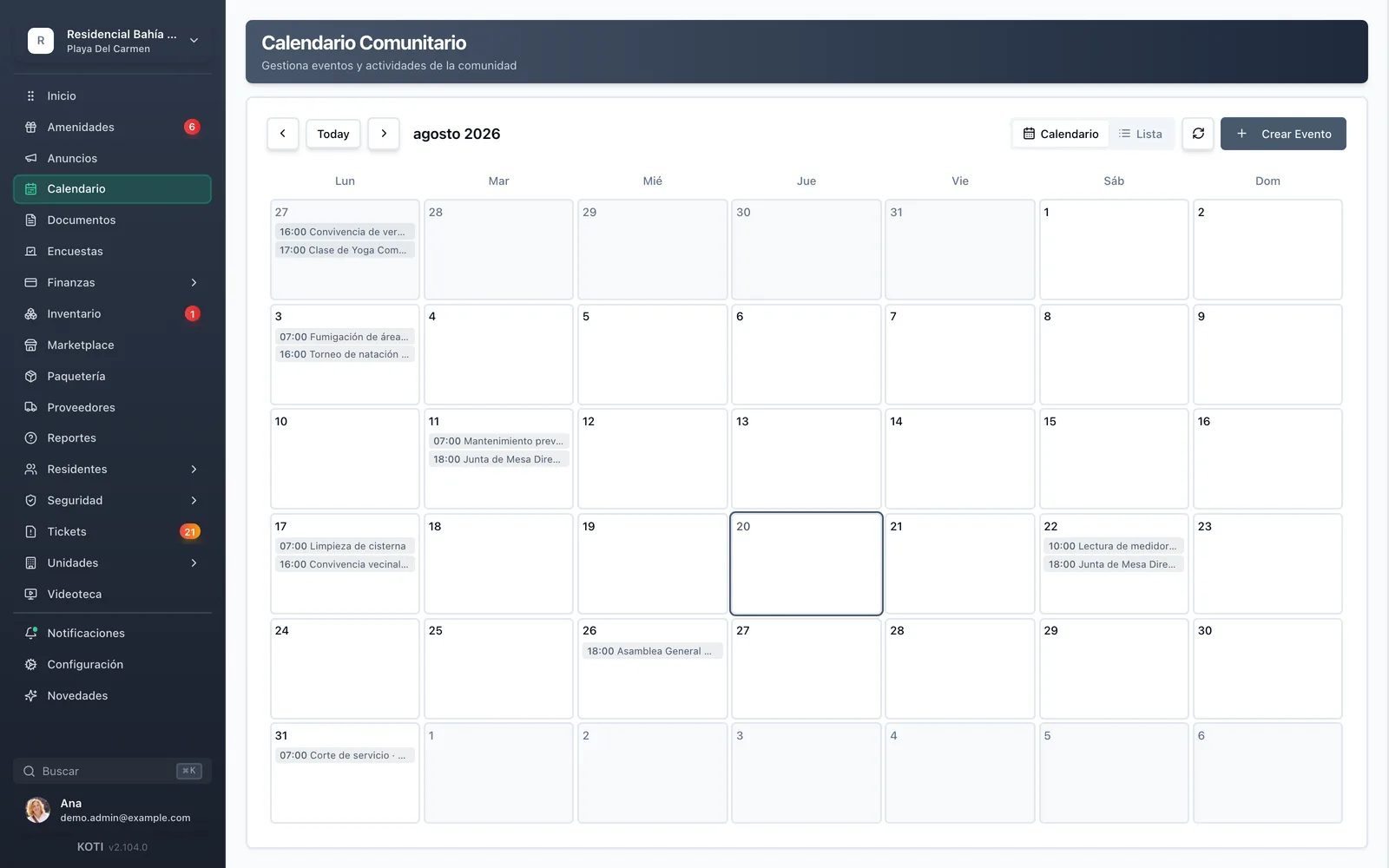
The Koti community calendar showing the general assembly, common-area fumigation, cistern cleaning and board meeting for the month.

The problem

What changes on day one

Today

The assembly date lives in a three-week-old message nobody can find any more.

With Koti

The month’s events sit in a calendar every resident opens from their app.

Today

Fumigation day arrives and half the community did not move their pets because they never heard.

With Koti

The event is published with a time and a location, and goes to the wall and to every resident’s phone.

Today

You are the reminder: you resend the same notice the day before, every single time.

With Koti

You schedule up to two reminders per event and they send themselves, to the recipients you choose.

Admin

Management publishes the whole month

Create the event, decide how it is announced, and leave the reminders scheduled. Once.

Monthly view of the Koti community calendar with maintenance, meetings and social activities.

Schedule

Everything happening in the community, in one month

  • Assemblies, board meetings, fumigations, cistern cleaning, meter readings, service outages and social events, all in one view
  • When creating the event you choose whether it is silent, wall-only, or also goes out as a push notification
  • Calendar or list view, with title, description, location and an all-day option

Resident

The resident opens their agenda and already knows what is coming

Community events and their own amenity bookings, in the same month.

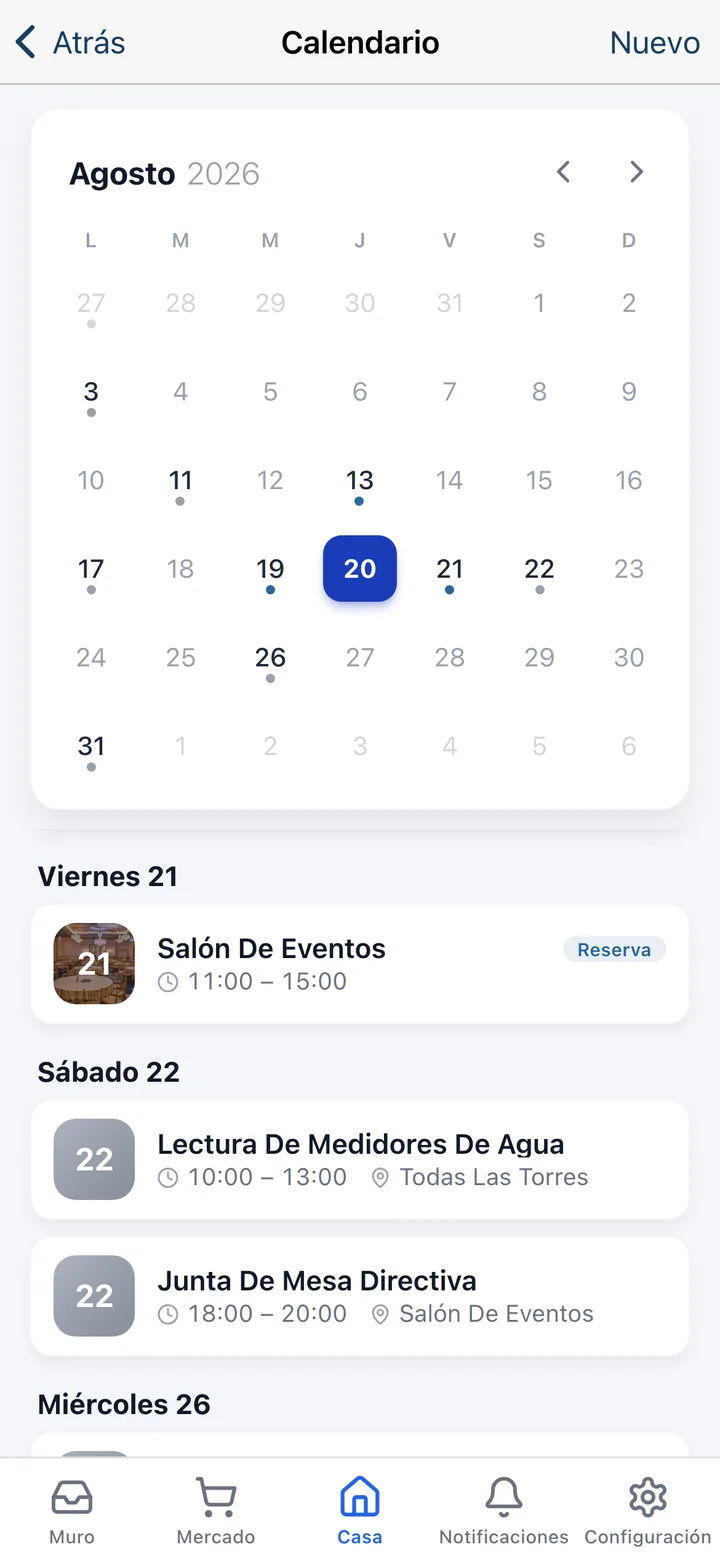
The Koti app calendar with the month marked up and the coming days’ agenda, including an events-hall booking.

Check

Their month and the community’s, together

  • A month view with marked days and the coming events listed underneath, with time and location
  • Their amenity bookings show up in the same agenda, flagged as bookings
  • Reminders reach the phone before the event, with nobody having to forward anything

In detail

Community calendar, in detail

Reminders that send themselves

Up to two reminders per event, with presets at 15 minutes, 30 minutes, 1 hour, 1 day before or 6:00 pm the day before, plus a custom interval in minutes, hours or days. Each reminder has its own recipients and cannot be scheduled more than seven days out.

Three ways to announce it

Silent, and the event only shows up on the calendar. Wall only, and it posts to the community feed. Or push and wall, and it also lands on every resident’s phone. You choose per event.

Internal events, staff only

An event can be flagged internal: visible only to admins and staff. The vendor visit, the elevator inspection or the management meeting do not need to show up on residents’ calendars.

Calendar or list view

The monthly grid to see the month’s load at a glance, and the list to review upcoming events in order. In the resident app, the grid marks days with activity and the agenda shows the detail.

Time, location and description

Every event carries a start and end date and time — or an all-day flag — a description, and an optional location: party room, pool, lobby, main garden. That is the difference between “there’s a meeting” and “meeting Thursday at 7 pm in the party room”.

The resident’s bookings, in the same agenda

When a resident books the party room or the courts, the booking appears in their calendar next to community events, flagged as a booking. One agenda instead of two separate screens.

What a community actually schedules

General assemblies, board meetings, preventive maintenance, fumigations, cistern cleaning, meter readings, scheduled service outages and neighbourhood get-togethers. Not a generic calendar: a community’s actual year.

Your turn: set it up in 5 minutes

Try Koti in your community today, without the headaches.

14-day free trial · No credit card required

Prefer to be shown around? Book a demoMessage us on WhatsApp

Security & compliance

SSL/TLS encryption

All communications encrypted and sensitive data protected in transit and at rest.

LFPDPPP compliant

Personal data protection compliant with Mexican law (LFPDPPP).

Daily backups on AWS

AWS infrastructure with automatic daily backups.

Frequently asked questions

You decide event by event. You can publish it silently — it only appears on the calendar — publish it to the community wall, or publish it to the wall and also send a push notification to every resident’s phone.
Yes, up to two per event. The presets cover 15 minutes, 30 minutes, 1 hour and 1 day before, plus 6:00 pm the day before — the one most used for assemblies. You can also define your own interval in minutes, hours or days, up to a maximum of seven days ahead.
Yes. An event flagged as internal is visible only to admins and staff. It is meant for vendor visits, inspections and internal meetings that have no business appearing on the community calendar.
Yes. The resident agenda combines community events with their own amenity bookings, flagged as bookings. So the Saturday they booked the party room and Wednesday’s assembly show up on the same screen.

Start with 14 free days

Set up your community in minutes and try all of Koti — no card, no lock-in.

No credit card requiredSee pricing

See everything in Communication
Questions? Chat with us