Finance · Statements

Statements & Payment Receipts for Condominiums

Each unit’s statement is generated automatically as a PDF and residents download it from their app instead of emailing you for it. Approving a payment issues the receipt, carrying the community logo and the administrator’s signature.

No credit card required

per-unit statement, generated automatically
PDFper-unit statement, generated automatically
the receipt carries the community logo and the admin’s signature
Signedthe receipt carries the community logo and the admin’s signature
residents download it themselves from their app
Zero emailsresidents download it themselves from their app
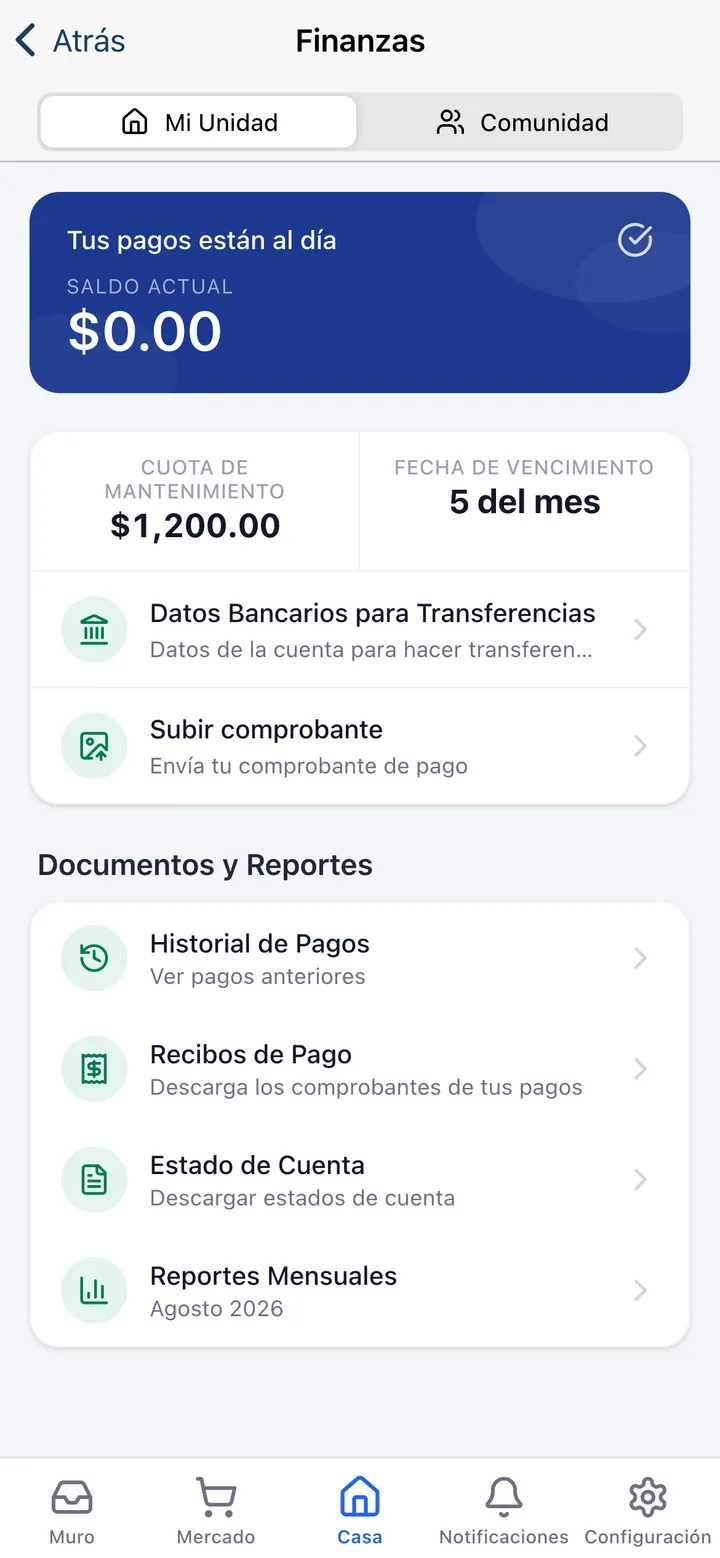
The Koti app finance screen with the current balance, the maintenance fee and links to payment history, receipts, account statement and monthly reports.

The problem

What changes on day one

Today

“Can you send me my statement?” — the same email, from a different resident, every week.

With Koti

Their unit’s statement lives in their app and downloads without going through management.

Today

The receipt gets typed in Word, signed with an image, and sent over WhatsApp when someone demands it.

With Koti

The receipt is generated automatically when the payment is approved, with the community logo and the admin’s signature.

Today

When somebody disputes a balance there is no document to show — only a spreadsheet that may have changed.

With Koti

Payment history, receipts and statements live in the resident’s app and in the system, with the community’s RFC printed on them.

Resident

The resident downloads it without emailing you

Payment history, receipts, account statement and monthly reports, all on one screen of their app.

The documents and reports section of the Koti app with payment history, receipts, account statement and downloadable monthly reports.

Download

Four documents, zero emails

  • Their unit’s statement and payment receipts, as PDFs, downloadable whenever they want
  • Every pending charge with its due date and, if they paid in instalments, how much of that charge is covered
  • A history of previous payments, so a question gets resolved without calling management
  • The community’s monthly reports: the “Community” tab shows the condominium’s finances, subject to the permissions you set

Admin

Management sets where those PDFs come from

The community’s RFC, its bank details and each unit’s balance: that is what gets printed on every document.

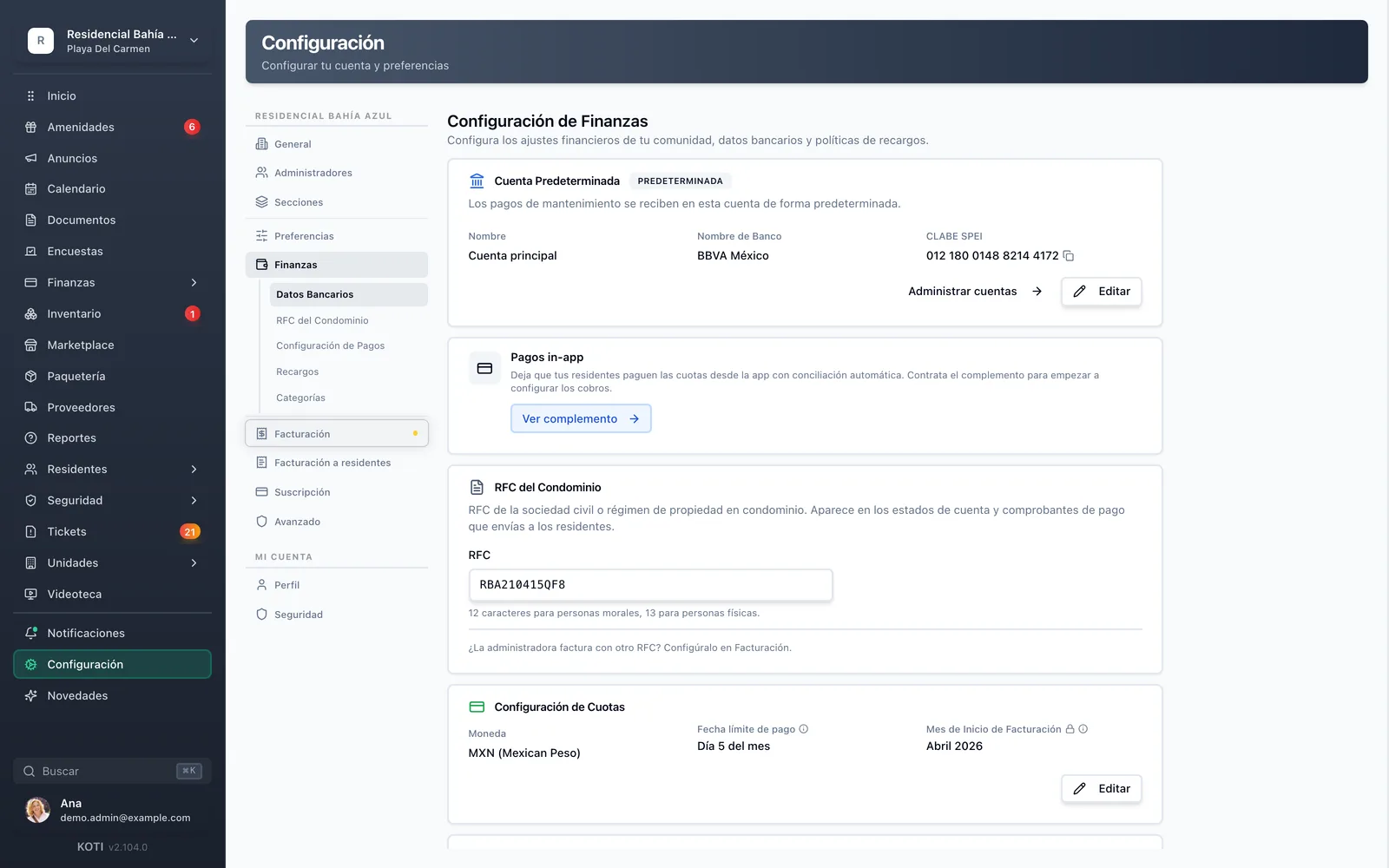
The Koti finance settings with the default account, the SPEI CLABE, and the community RFC that appears on statements and receipts.

Identity

The community’s RFC, entered once

  • The RFC of the civil association or condominium regime appears on the statements and receipts you send
  • The default account, with bank and SPEI CLABE, is the one residents see in order to transfer
  • If the management company invoices under a different RFC, that is configured separately under invoicing
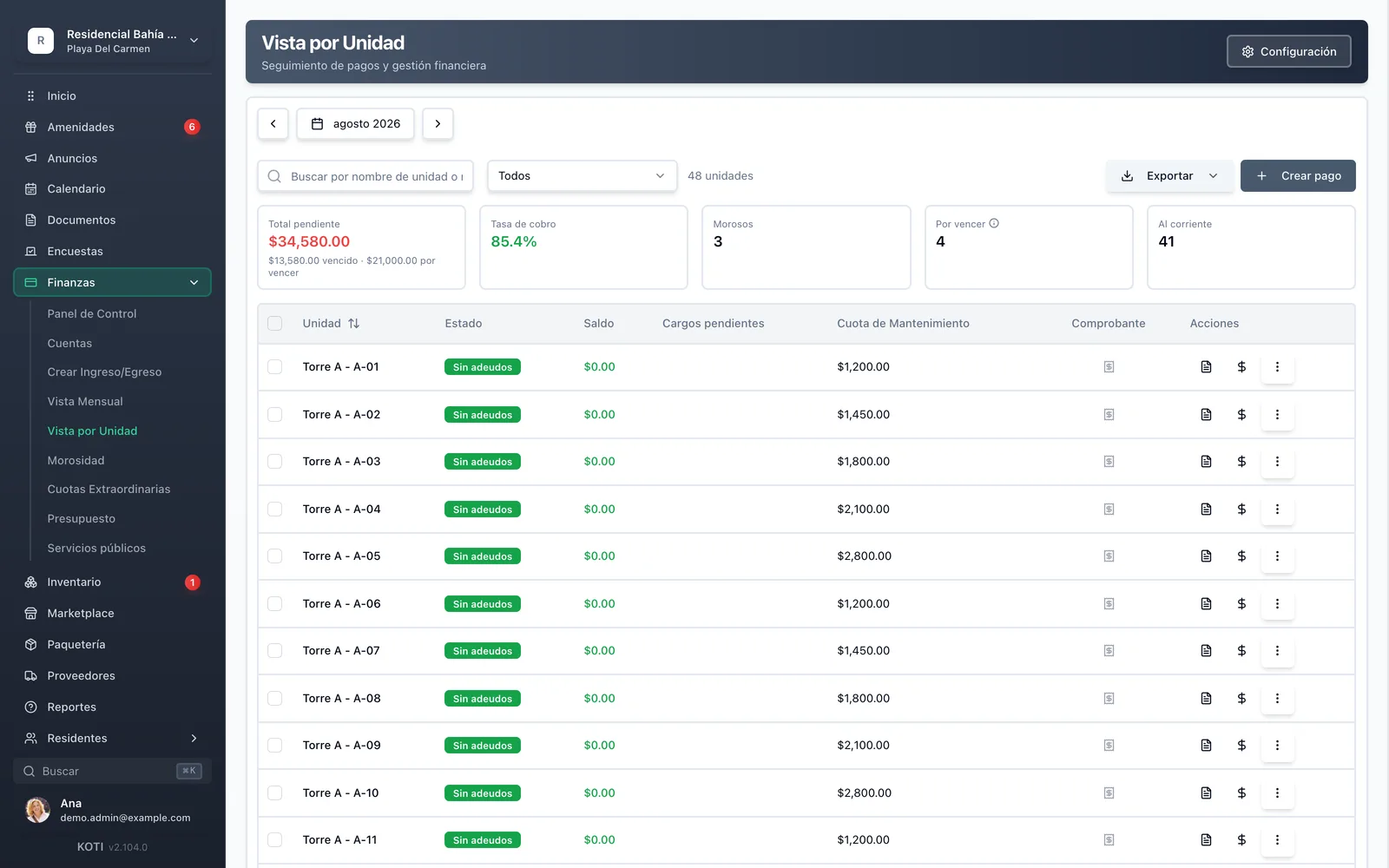
The Koti per-unit view with each unit’s balance, pending charges, fee and proof of payment, plus the export option.

Per unit

The balance behind the statement

  • Every unit with its balance, pending charges, fee and the proof backing its most recent payment
  • Approving the payment issues the receipt — the resident finds it in their app without you sending it
  • Export the full view when someone asks for the whole community’s detail, not just one unit’s

In detail

Statements & receipts, in detail

Automatic account statement

A PDF is generated per unit automatically and the resident downloads it from their app: management assembles and sends nothing. The document carries the community’s RFC, so it works as backup rather than merely as a reminder.

Signed payment receipt

As soon as a payment is approved the receipt is generated, with the community logo and the administrator’s signature. It is a professional PDF the resident downloads after validation, without asking.

Payment history

Every previous payment on the unit, inside the resident’s app. Most balance questions get resolved there and never reach management.

The community’s RFC

It is entered once in the finance settings — 12 characters for legal entities, 13 for individuals — and from then on it appears on the statements and payment receipts you send to residents.

Bank details in plain sight

The community’s default account, with its bank and SPEI CLABE, is the reference residents see when they are about to transfer. One less thing to ask over WhatsApp, and one less thing to mistype.

The community’s monthly reports

Beyond their own statement, residents can download the community’s monthly financial report from the community tab, if you granted them that permission. Transparency stops being extra work for management.

Who sees which finances

Transparency is dosed. You define whether a resident sees nothing, sees only their unit, or also sees the whole community’s finances — and you can set it differently for owners and for tenants. An owner can additionally open up their unit’s finances to their tenant without asking you.

Exports for the assembly

The per-unit view and the delinquency report export to PDF, CSV and Excel. And when you need every unit’s statement at once, they download in bulk — one PDF per unit inside a single file.

Built for Mexico

Documents a Mexican condominium can actually present

A statement, a proof of payment and a CFDI are three different things, and a Mexican condominium needs all three.

Per-unit statement

The PDF with the unit’s balance and charges, with the community’s RFC printed, downloadable by the resident.

Proof of payment

An automatic receipt on approving the payment, with the community logo and the administrator’s signature.

CFDI 4.0 when it is needed

The SAT-stamped fiscal invoice is an optional add-on, for the communities that require it.

Your turn: set it up in 5 minutes

Try Koti in your community today, without the headaches.

14-day free trial · No credit card required

Prefer to be shown around? Book a demoMessage us on WhatsApp

Security & compliance

SSL/TLS encryption

All communications encrypted and sensitive data protected in transit and at rest.

LFPDPPP compliant

Personal data protection compliant with Mexican law (LFPDPPP).

Daily backups on AWS

AWS infrastructure with automatic daily backups.

Frequently asked questions

No. Each unit’s statement is generated automatically as a PDF and the resident downloads it from their app when they need it. Management neither assembles the document nor emails it.
Yes. When a payment is approved a PDF receipt is generated automatically, carrying the community logo and the administrator’s signature. The resident downloads it after validation, without having to ask.
No. The statement is the community’s document with the unit’s balance and charges, and the proof of payment is the receipt confirming it was paid. The SAT-stamped CFDI 4.0 invoice is a third document, and in Koti it is an optional add-on.
The community’s RFC — that of the civil association or the condominium property regime — is entered once in the finance settings and appears on statements and payment receipts. The receipt additionally carries the community logo and the administrator’s signature.
It depends on the permissions you set. The app separates “My unit” from “Community”: the first holds their balance and documents, the second the community’s monthly financial report. You can decide separately what owners see and what tenants see — from nothing, to their unit only, to the community’s full finances.

Start with 14 free days

Set up your community in minutes and try all of Koti — no card, no lock-in.

No credit card requiredSee pricing

See everything in Finance
Questions? Chat with us