Communication · Documents

Document Management for Condominiums

Tired of residents asking “Where do I find the rules?” or “Can you send me that form?” Koti’s Document Hub puts every important document in one secure, searchable location that residents can access 24/7.

No credit card required

permission levels: admin only, owners only, or everyone
3permission levels: admin only, owners only, or everyone
Resident document access
24/7Resident document access
Always the current document
VersionedAlways the current document
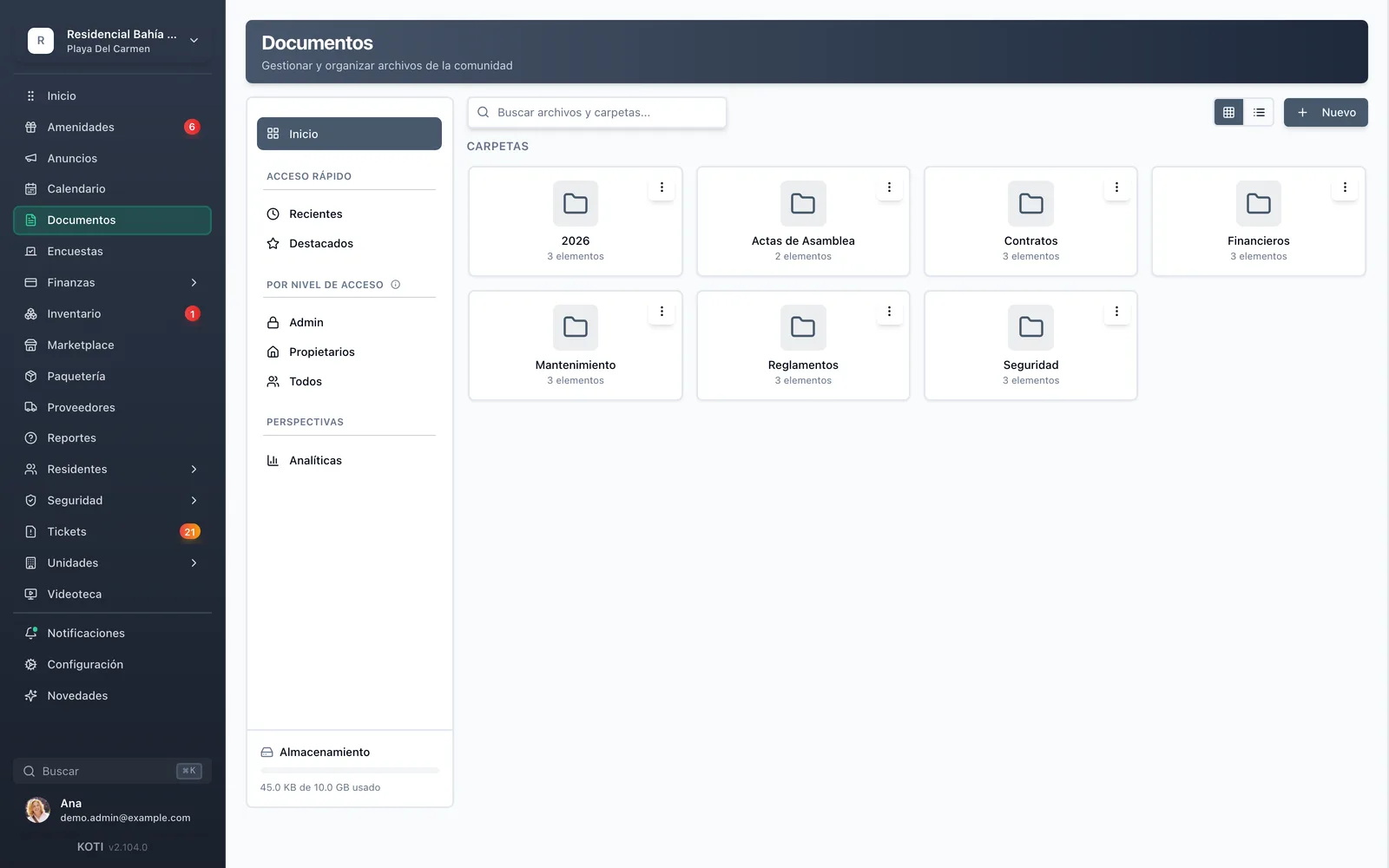
The Koti documents panel showing folders for bylaws, assembly minutes, contracts and financials.

The problem

What changes on day one

Today

Every week somebody asks over WhatsApp where the bylaws are and you forward the same PDF for the fifth time.

With Koti

Every community document is organized and searchable in one place, available around the clock.

Today

Three versions of the bylaws are in circulation and nobody knows which one is current.

With Koti

Upload new versions and the system automatically archives old ones: residents always open the current one.

Today

The minutes listing each unit’s balance end up in the neighbours’ group chat because there was no other way to share them.

With Koti

Control who can see what documents with role-based permissions and secure sharing.

Admin

Management organizes it and decides who sees what

A mini Drive inside Koti: folders by topic, search, and an access level on every file.

Document folders in the Koti panel: assembly minutes, contracts, financials, maintenance, bylaws and security.

Organize

A mini Drive for your community

  • Folders by topic — assembly minutes, bylaws, contracts, financials, maintenance, security — and sub-folders by year
  • Every file carries its access level: admin only, owners only, or everyone (owners and tenants)
  • File and folder search, quick access to recent and starred items, and a filter by access level

Resident

The resident finds it without asking you

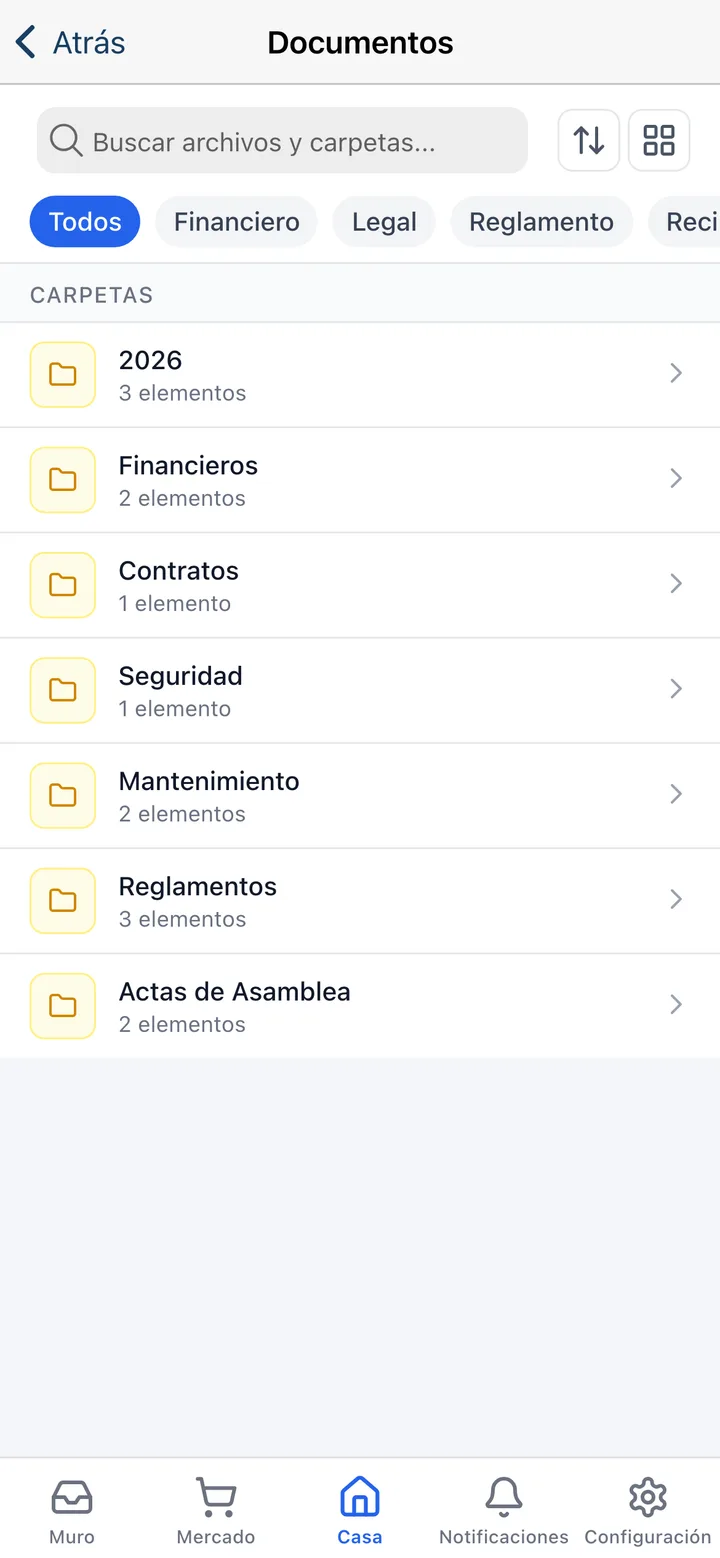
The same folder, on their phone, showing what they are entitled to see and nothing else.

The Koti app showing the community’s document folders with filters by type.

Look it up

Never answer “where do I find…?” again

  • Residents can quickly find any document with intelligent search and intuitive categorization
  • Filters by type: financial, legal, bylaws, receipts, maintenance and minutes
  • They only see what is theirs: a tenant never sees owner-only or admin-only documents

In detail

Documents & minutes, in detail

Three permission levels

Admin only, owners only, or everyone — owners and tenants. The ladder is hierarchical: what owners see, admins see, and what everyone sees, owners see. Share sensitive documents with the board while keeping general information public.

Board members and staff

On top of the three community levels there is a board-members level, and you can add access for specific staff roles — security, for instance — without opening the document to the whole community.

Smart search and organization

Residents can quickly find any document with intelligent search and intuitive categorization. Smart categorization makes everything easy to locate, without calling or emailing you.

Version control that prevents confusion

Upload new versions and the system automatically archives old ones. Residents always access current forms and rules, eliminating confusion and outdated information.

Folders by topic and by year

Bylaws, assembly minutes, financial statements, contracts, maintenance and security, each in its own folder, with sub-folders per year. The structure you already use on paper, minus the filing cabinet.

Starred, recent and shared

Star the files people look up constantly to keep them one click away, review what you recently uploaded or opened, and see at a glance what is shared with residents.

PDF, Word, Excel and images

Upload up to ten files at a time, up to 50 MB each, in PDF, Word, Excel, JPG, PNG, GIF or WebP. The scanned minutes, the spreadsheet budget and the PDF policy all live in the same place.

Archive analytics

The documents panel includes an analytics view and a storage-usage indicator, so you know what gets consulted and how much space the community archive takes up.

Built for Mexico

The documents a Mexican condominium has to be able to produce

Minutes, bylaws and financial statements are not filing-cabinet paperwork: they are what gets requested at an assembly, at a change of management, or in a dispute between neighbours.

Assembly minutes

Every set of minutes sits in its folder with its date, available to owners without you resending it. When somebody asks what was agreed two assemblies ago, the answer is already published.

The current internal bylaws

The community bylaws are the most quoted and least read document there is. With one current version and the older ones archived, arguments about which rule applies simply stop.

Owners and tenants

The owner/tenant distinction is a permission level, not a mental note: financial statements can stay visible to owners only while the bylaws are visible to everyone.

Your turn: set it up in 5 minutes

Try Koti in your community today, without the headaches.

14-day free trial · No credit card required

Prefer to be shown around? Book a demoMessage us on WhatsApp

Security & compliance

SSL/TLS encryption

All communications encrypted and sensitive data protected in transit and at rest.

LFPDPPP compliant

Personal data protection compliant with Mexican law (LFPDPPP).

Daily backups on AWS

AWS infrastructure with automatic daily backups.

Frequently asked questions

Yes. Every file is published with one of three levels: admin only, owners only, or everyone — owners and tenants. That is the usual way to publish financial statements and minutes for owners while leaving the bylaws visible to all. There is also a board-members level and the option to add access for specific staff roles.
You upload the new version and the system archives the previous one, so residents always access the current document while historical versions remain available for reference. That is exactly the problem three different PDFs circulating on WhatsApp create.
PDF, Word (.doc and .docx), Excel (.xls and .xlsx) and images in JPG, PNG, GIF or WebP. You can upload up to ten files at once and each may weigh up to 50 MB, enough for scanned minutes or a floor plan.
Yes. The resident app has the same folder structure, a file and folder search, and filters by type — financial, legal, bylaws, receipts. Each resident sees only the documents their access level allows.
For community documents, yes: it is a mini Drive inside Koti, with the difference that permissions are expressed in the language of a condominium — admin, board, owners, everyone — rather than in email lists you have to maintain by hand every time somebody sells or rents their unit.

Start with 14 free days

Set up your community in minutes and try all of Koti — no card, no lock-in.

No credit card requiredSee pricing

See everything in Communication
Questions? Chat with us