Finance · Fees

Automatic HOA Fee Collection for Condominiums in Mexico

You configure the fee once and the charge applies itself to every unit on the first of the month. Special assessments are billed only to the units that take part, with per-unit amounts, and batch operations turn a hundred approvals into one click.

No credit card required

monthly charges apply themselves to every unit
Day 1monthly charges apply themselves to every unit
a different amount per unit on special assessments
Per unita different amount per unit on special assessments
select all, deselect late units, approve in one click
In batchselect all, deselect late units, approve in one click
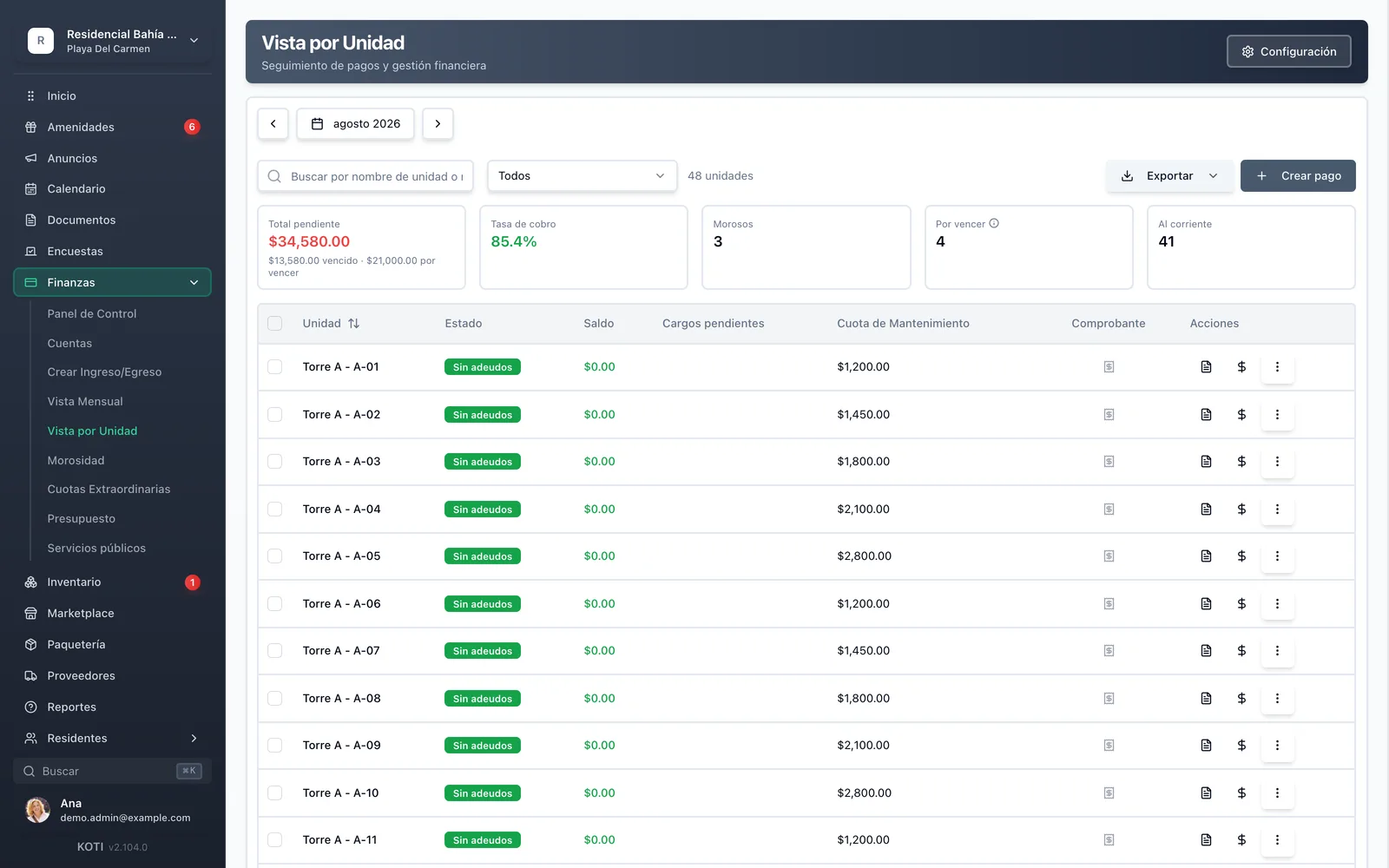
The Koti per-unit view with total outstanding, collection rate and the unit table showing balance, pending charges and maintenance fee.

The problem

What changes on day one

Today

Every month the same spreadsheet gets copied, the dates get changed, and you hope nobody moved units.

With Koti

Monthly charges apply automatically to every unit on the first, following each unit’s own configuration.

Today

The roof-waterproofing assessment lives on a separate list, and halfway through nobody knows how much has come in.

With Koti

The special assessment is one concept with per-unit amounts, units charged, units paid and a live collection rate.

Today

Approving payments for a hundred units means a hundred identical clicks, one at a time, every month.

With Koti

You select all, deselect the late units and approve the rest in a single operation.

Admin

Management configures it once a year

Currency, deadline and billing start month; after that the system charges on its own and you only review.

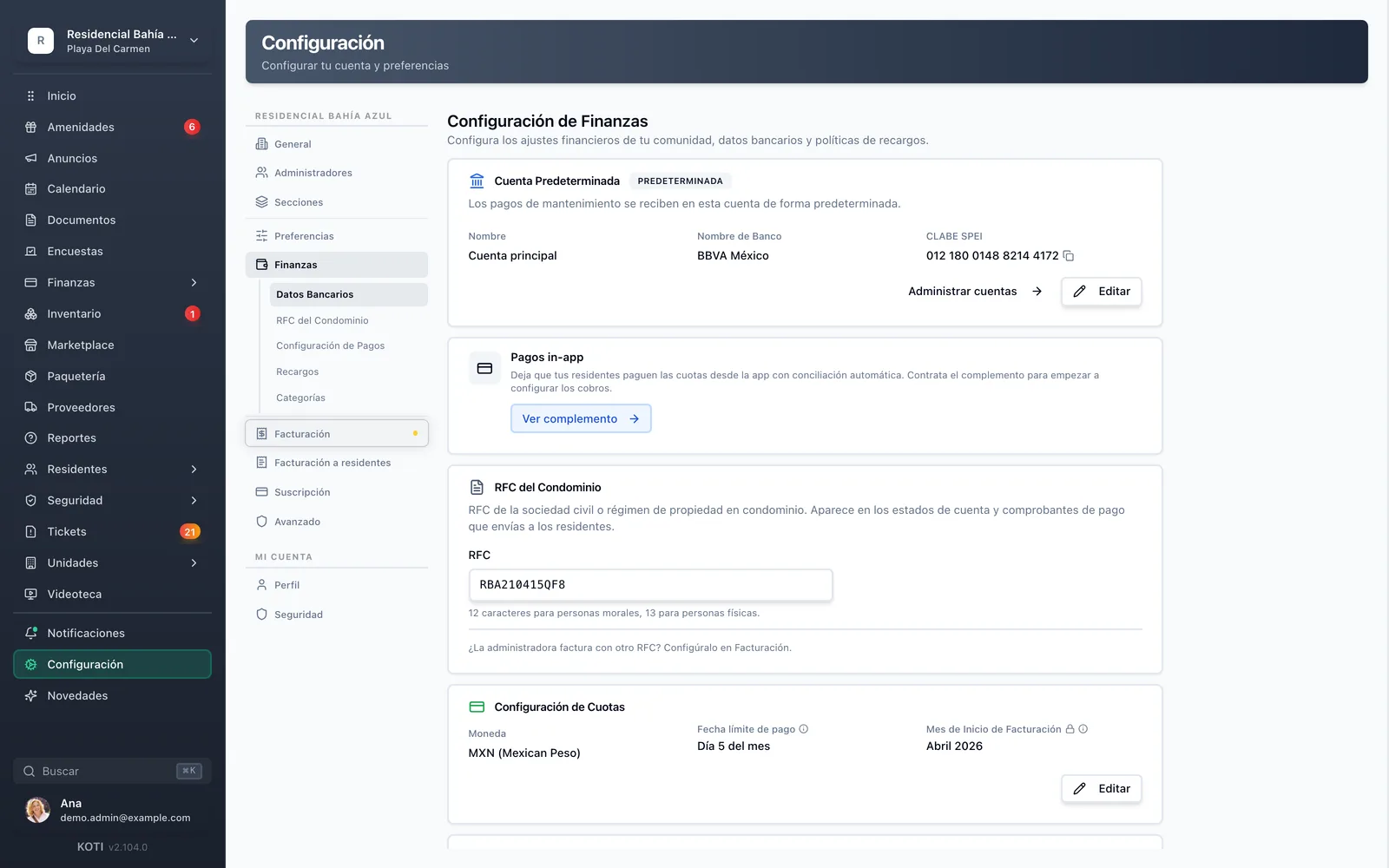
The Koti finance settings with the default account, SPEI CLABE, the community’s RFC, and the fee configuration with currency and payment deadline.

Configure

The rule gets set once

  • Currency, the month’s payment deadline and the billing start month
  • The community’s default account with its bank and SPEI CLABE: that is where fees land
  • The community’s RFC, which then appears on the statements and receipts you send
The Koti per-unit view with checkboxes, status, balance, pending charges, maintenance fee and proof of payment for each unit.

Charge

A hundred units, one operation

  • Total outstanding split between overdue and not-yet-due, plus the month’s collection rate
  • Every row with its status, balance, pending charges, fee and proof — and the fee can differ unit by unit
  • Select all, deselect the late units and approve the rest in one pass; the same works for late fees and deletions
  • Exempt units, units with no fee and units still under construction are marked “not billed” and never skew the collection rate
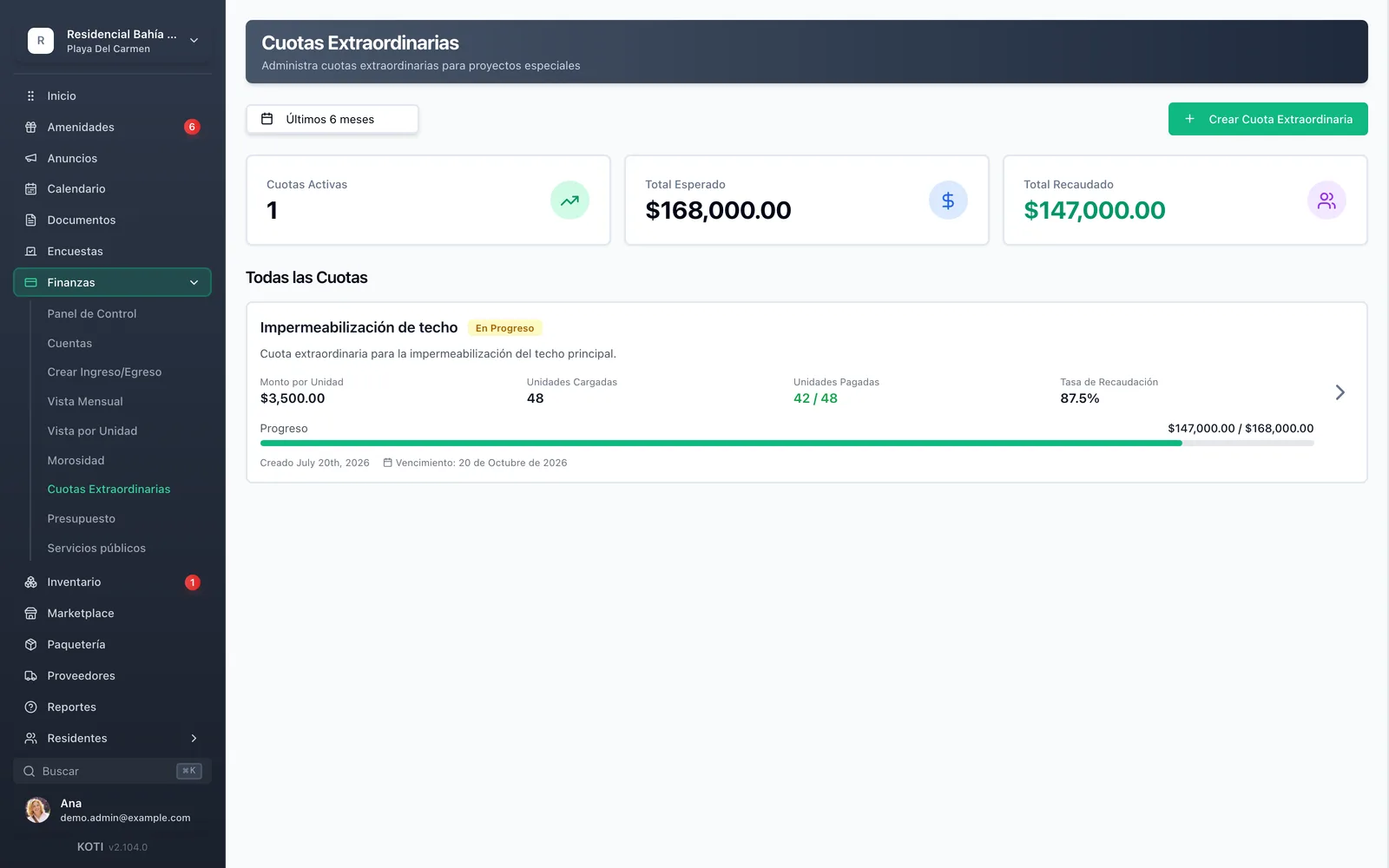
The Koti special assessments screen with the per-unit amount, units charged, units paid, collection rate and a progress bar.

Assessments

The project, with its own books

  • One concept — “roof waterproofing” — applied only to the units that take part
  • Per-unit amount, units charged, units paid and collection rate, with a progress bar
  • Expected total versus collected total, so you always know whether the project is funded

Resident

The resident sees what they are charged, and why

Their unit, their occupancy type and their maintenance fee, on one screen — with no call to management to ask.

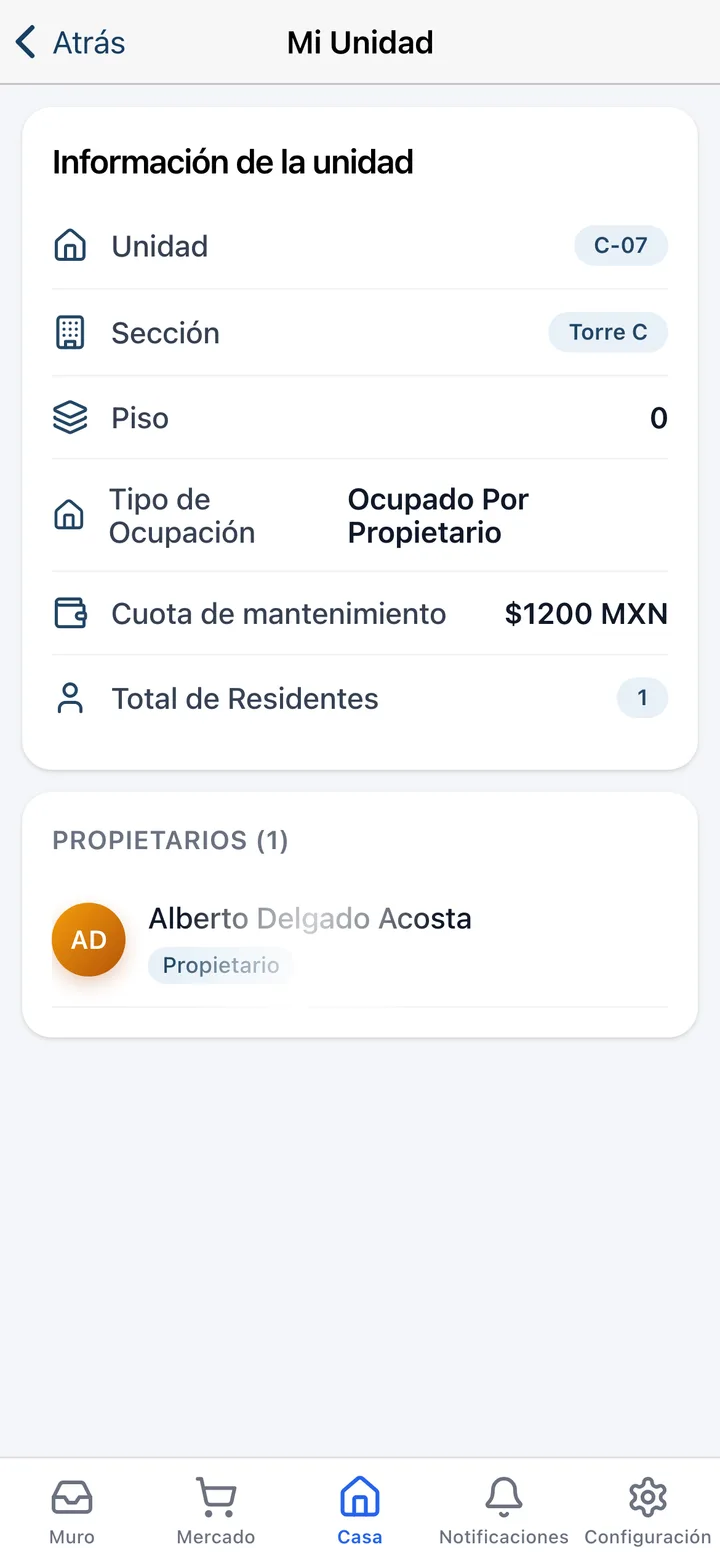
The “My Unit” screen in the Koti app with unit, section, floor, occupancy type, maintenance fee and registered owners.

My unit

The fee, next to the unit it belongs to

  • Unit, section and floor, plus the occupancy type: owner-occupied or tenant-occupied
  • That unit’s maintenance fee, in pesos, without having to ask for it
  • The owners and residents registered on the unit, so the account always has a clear owner

In detail

Fees & charges, in detail

Batch operations

Built for 50, 100+ unit communities: select all, deselect the late units, and approve every payment in one click. The same works for applying late fees and for deleting charges. It is the difference between an afternoon of month-end close and ten minutes.

Automatic charges on the first

Once configured, monthly maintenance charges apply to every unit on the first, with nobody having to open the system. Each unit gets the charge that belongs to it, per its own configuration.

Special assessments

Create a single fee concept and apply it to one or more units — not all of them have to take part — with amounts that can vary per unit. You choose how it splits: equally, proportionally to each unit’s monthly fee, or by entering every amount by hand; and even after that you can adjust it row by row. The screen tracks expected total, collected total, units paid and the collection rate for each assessment.

Partial payments with progress

A resident can pay in instalments and the system tracks the progress instead of treating the balance as all-or-nothing. Custom payment plans are reflected automatically in the account statements.

A different fee per unit

The maintenance fee is defined per unit, not per community, so a penthouse and a studio can pay different amounts without keeping two lists. Every row of the per-unit view shows its fee next to its balance.

Deadline and billing start

You set the day of the month the fee falls due — from the 1st to the 28th, so no February ever breaks the rule — and the month the community starts being billed. From there, that deadline is the same reference used by late fees, the early-payment discount, reminders and the resident’s statement.

Early payment discount

The other half of the incentive: on top of the late fee, you can configure a discount — a flat amount or a percentage — for anyone who pays before the day you set. The carrot works better than the stick when the person collecting lives in the same community.

You bring your history with you

Switching systems should not erase what was already owed. The historical-records wizard creates the billing periods and charges from before your start date, with the fee each unit actually had at each point in time and with the months that do not apply excluded one by one.

Your turn: set it up in 5 minutes

Try Koti in your community today, without the headaches.

14-day free trial · No credit card required

Prefer to be shown around? Book a demoMessage us on WhatsApp

Security & compliance

SSL/TLS encryption

All communications encrypted and sensitive data protected in transit and at rest.

LFPDPPP compliant

Personal data protection compliant with Mexican law (LFPDPPP).

Daily backups on AWS

AWS infrastructure with automatic daily backups.

Frequently asked questions

Yes. Once the fee is configured, the monthly charge applies automatically to every unit on the first, following each unit’s configuration. There is nothing to open and no previous month’s sheet to copy.
Yes, and that is exactly what the special assessments module is for: you create a concept and apply it only to the participating units, with amounts that can differ for each. You then see the expected total, collected total and collection rate for that specific assessment.
Yes. The maintenance fee is defined per unit, so you can reflect differences in size or indiviso without keeping parallel lists. The per-unit view shows each unit’s fee next to its balance and pending charges.
They are built for 50, 100+ unit communities. You select every unit, deselect the ones that are late, and approve the rest of the payments in a single operation. The same mechanism applies late fees and deletes charges in bulk.
Yes. The system accepts partial payments and tracks the progress, both on the ordinary fee and on special assessments. Custom payment plans are reflected automatically in the unit’s account statement.

Start with 14 free days

Set up your community in minutes and try all of Koti — no card, no lock-in.

No credit card requiredSee pricing

See everything in Finance
Questions? Chat with us