Operations · Staff

Staff Management for Condominiums

Modernize the management of your maintenance, security and service teams: a file per person, tasks with an owner and a due date, and area-scoped permissions so everyone only gets into what is theirs.

No credit card required

staff types, from security to gardening
10staff types, from security to gardening
permission areas: finance, operations, security, communication and residents
5permission areas: finance, operations, security, communication and residents
the gatehouse signs in with a device credential
No emailthe gatehouse signs in with a device credential
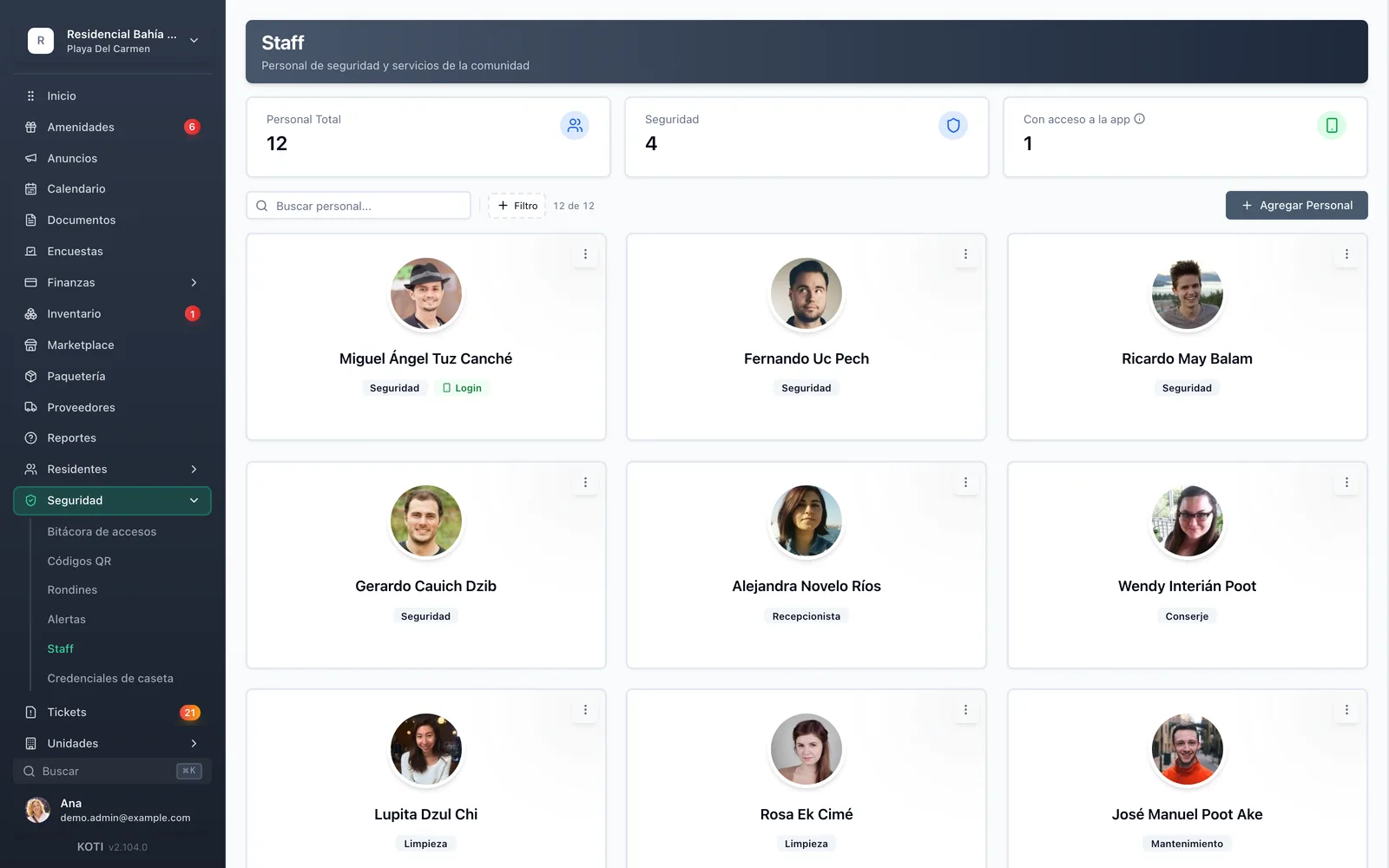
The Koti staff panel showing the community’s security, cleaning and maintenance team.

The problem

What changes on day one

Today

So the bookkeeper can see payments, someone lends them the administrator’s password.

With Koti

Limited administrators only reach the areas you assign them, and anyone with no areas reaches nothing.

Today

Staff tasks get handed out over WhatsApp and by month end nobody knows which ones were left undone.

With Koti

Every task has an owner, a priority, a due date and photo evidence of progress.

Today

Something happened at three in the morning and there is no way to know who was on shift.

With Koti

Everyone identifies themselves when their shift starts and leaves handoff notes for the next one.

Admin

Management defines who is who and what they see

Manage all staff members, roles, and responsibilities from one centralized platform.

The Koti staff register with photos, role type and who has app access.

Team

The team, with a file each

  • Ten role types: security, reception, concierge, cleaning, maintenance, gardening, pool, administration, contractors and other
  • A file with a photo and an ID document, whether or not they use the app
  • Offboarding archives rather than deletes, so the record of who passed through the community survives
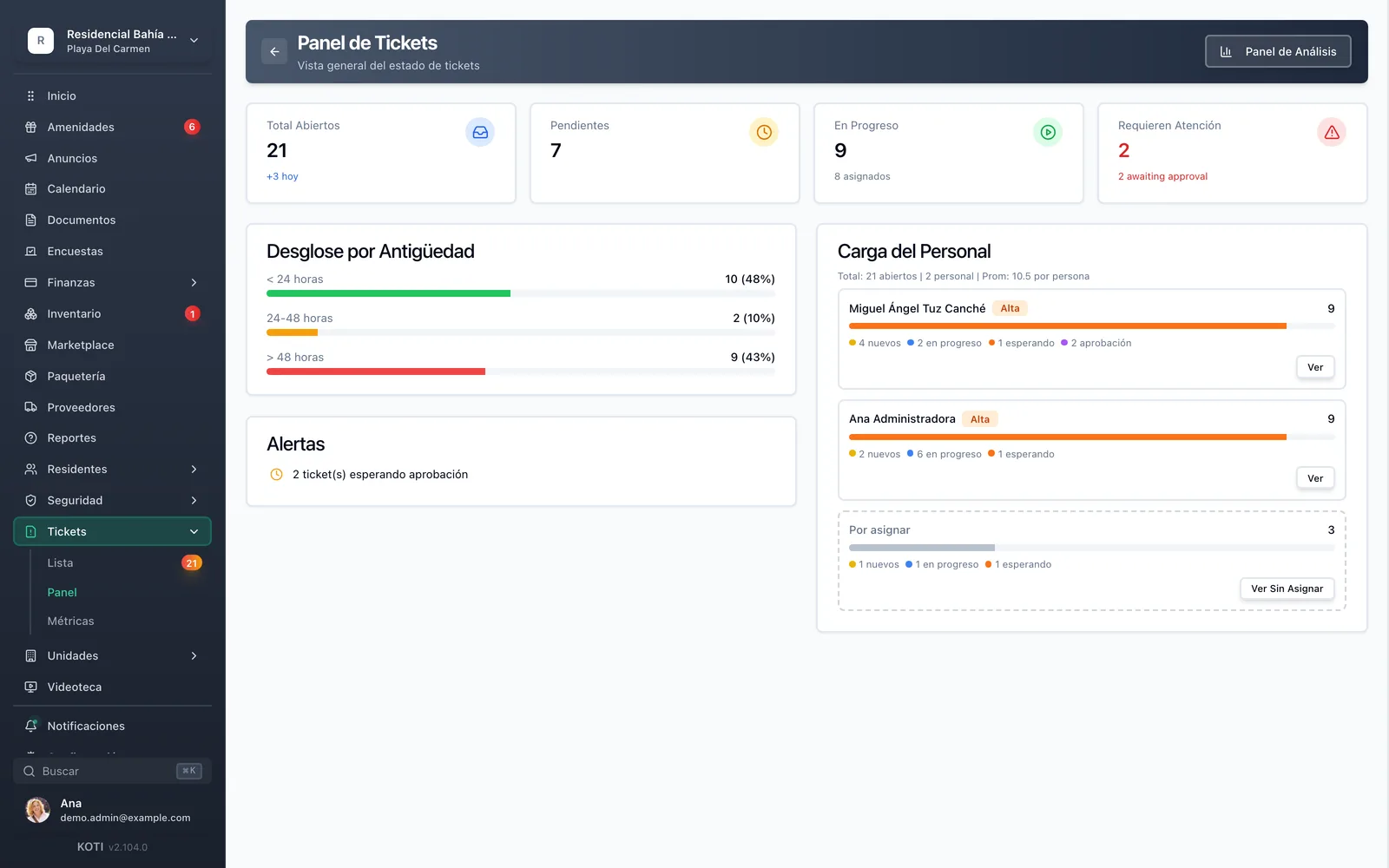
The Koti ticket board showing tasks assigned to community staff.

Assign

Delegate, then actually follow up

  • Each task is assigned to one person, with a priority and a due date
  • Status advances through valid steps: pending, in progress, waiting for info, pending approval, resolved
  • Closing requires a resolution note, so “it’s fixed” always has a sentence behind it

Security

The team works from their phone

The same app the gatehouse uses gives maintenance and cleaning their list for the day, and keeps track of the shift.

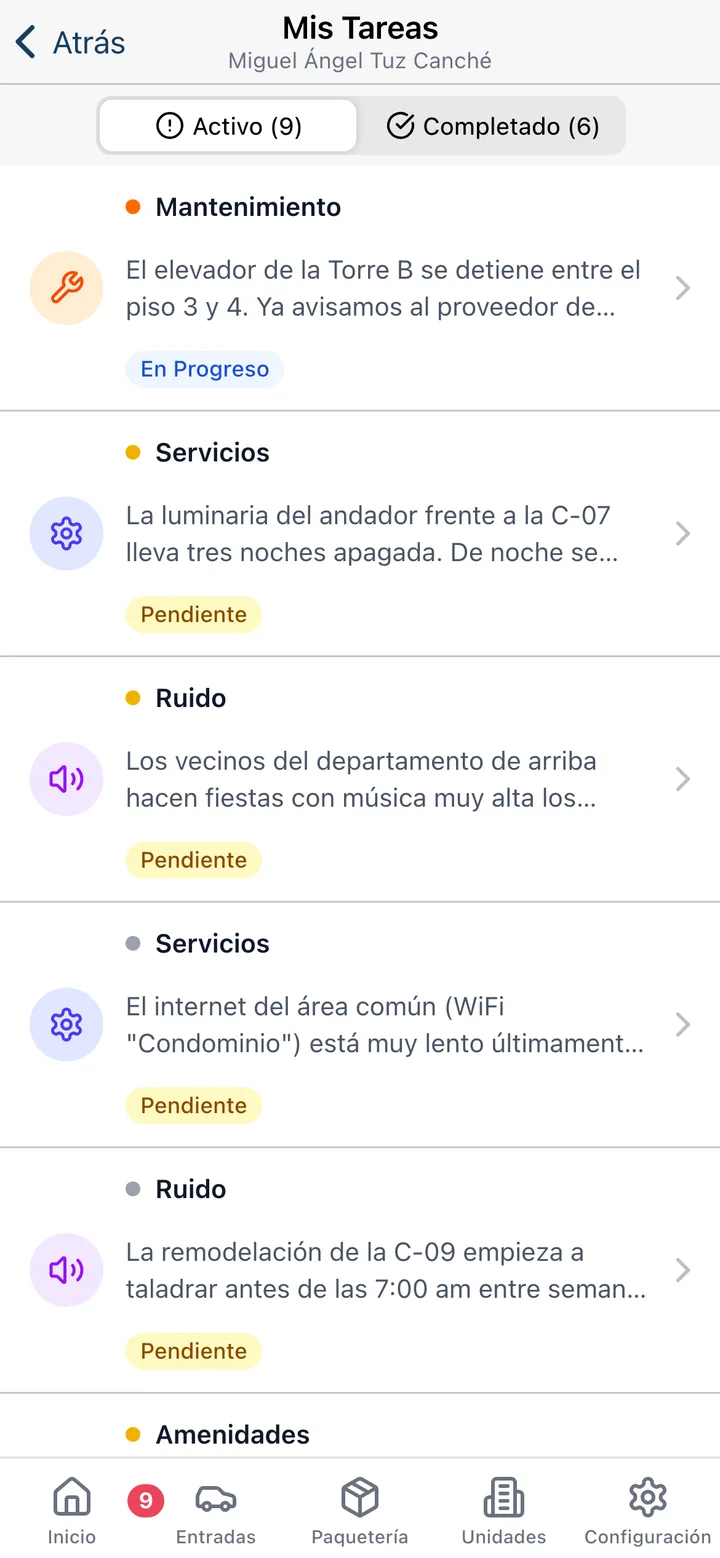
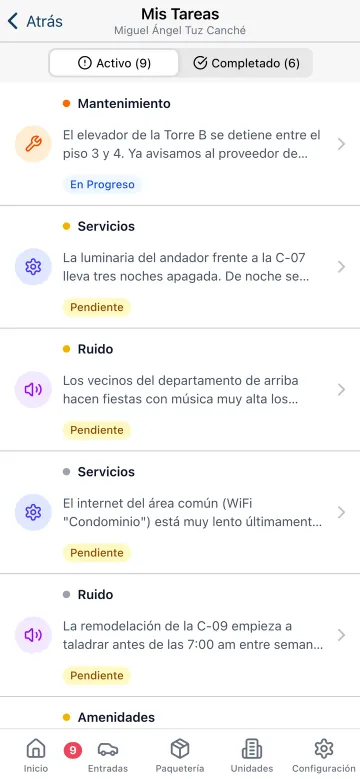
The staff task list in the Koti app, with priority and due date.

Their list

Today’s work, with priority and a photo

  • Active and completed tasks, with priority and flags for overdue, today and tomorrow
  • Comments with photos to document progress without writing a separate report
  • On resolution, the closing note stays attached to the task forever
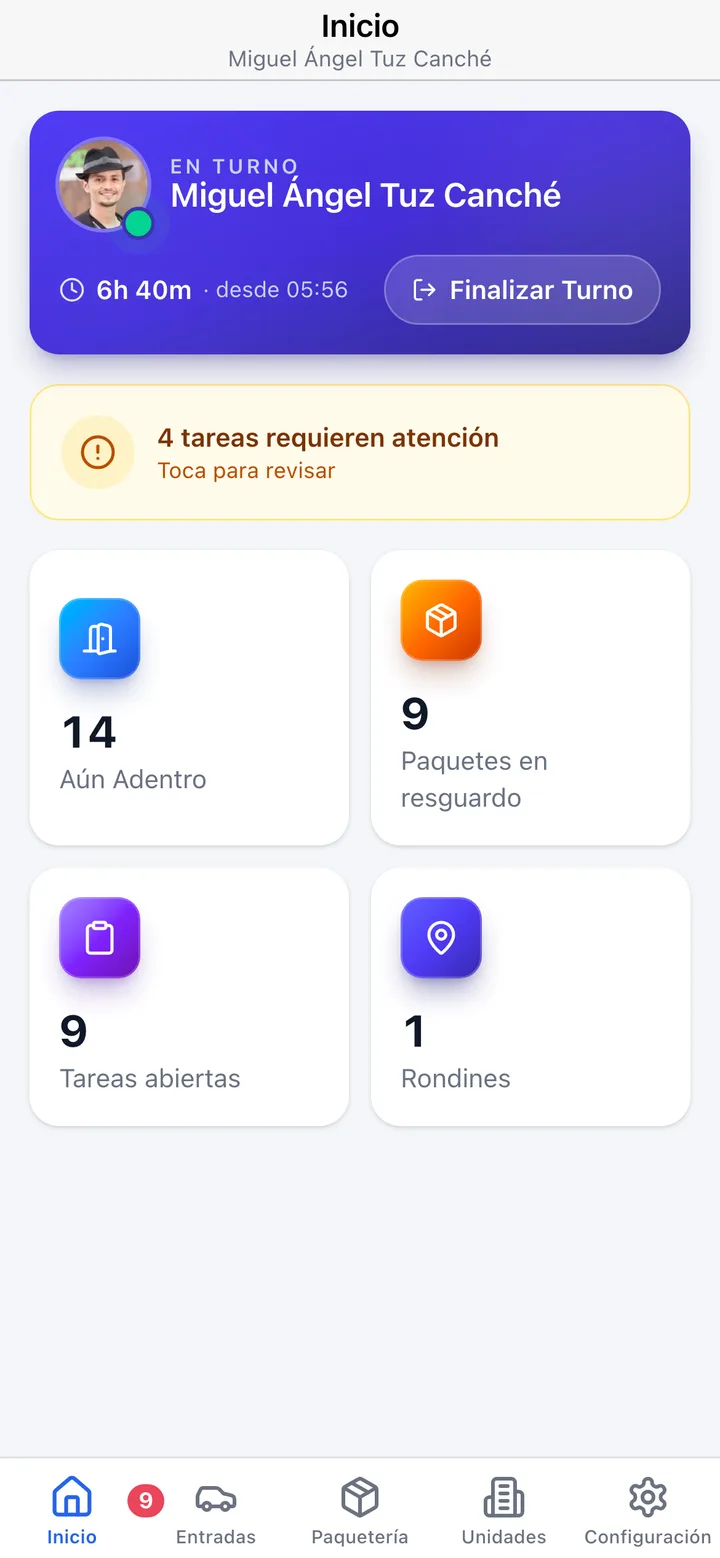
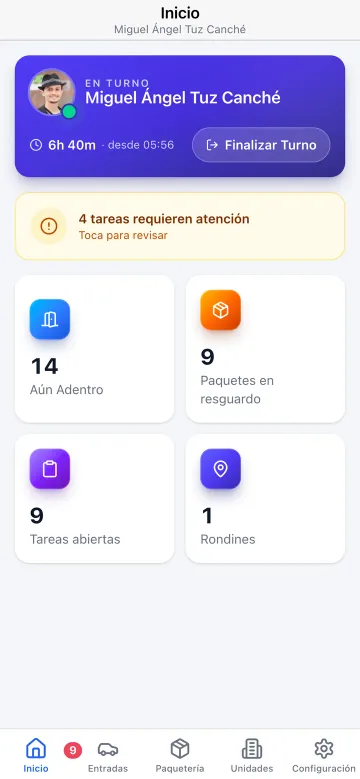
The Koti staff app home screen with the shift in progress and the day’s summary.

Shift

Who is on, and what they leave the next one

  • The gatehouse device is shared: each person identifies themselves when their shift starts
  • A running timer for the current shift, in plain sight, with no sign-in sheet
  • The handoff carries notes for the next shift, and those notes stay on the record

In detail

Staff & roles, in detail

Permissions by area, not all-or-nothing

A full administrator sees everything, settings included. A limited administrator only reaches the areas you assign: finance, operations, security, communication and residents. The bookkeeper sees payments without touching the gatehouse; the board sees finances without getting into the register. Anyone with no areas assigned reaches nothing.

Administrator role

Shortcuts:

Access areas

admin.koti.mx/finanzas
RPResidencial Bahía AzulScoped

You do not have access to this section

A general administrator can widen your access areas.

1 of 13 sections visibleScoped
Check an area and watch the app: the sidebar rearranges and the person lands on the screen that belongs to them. It is the same logic that runs in production.

Ten staff types

Security, reception, concierge, cleaning, maintenance, gardening, pool, administration, contractors and other. The filter shows how many people are in each type, so you can tell at a glance whether cleaning coverage is one person or five.

A file with ID on it

A profile photo and an ID document per person, whether or not they use the app. When a new contractor starts or the security company changes, you know who you let in and since when.

App access only for who needs it

The gardener who comes on Tuesdays does not need an account; the maintenance lead does. Each file is linked, or not, to an app account, and the panel tells you how many of the team have access.

Gatehouse credentials

Gatehouse tablets and phones sign in with their own credential, created by giving it a label. The password is shown exactly once, and it is revoked the day the security company changes without touching anything else.

Tasks with an owner and evidence

Task assignment to maintenance, security or cleaning, with critical, high, medium or low priority and a due date. Staff document progress with comments and photos from their phone, and closing requires a resolution note.

Shift and handoff

On a device three shifts share, each person identifies themselves on arrival and the timer runs in plain sight. The handoff is delivered with notes for whoever is next, and it stays on record who was there when something happened.

Suppliers and complianceComing soon

Security and cleaning are almost always a company rather than payroll. The supplier module stores tax ID, regime, bank details and withholdings, alongside the tax status certificate, the SAT 32-D opinion, IMSS, INFONAVIT, the REPSE registration, the insurance policy and the contract — with an expiry traffic light and a warning before anything lapses.

Built for Mexico

Built for how a Mexican community is actually staffed

In most Mexican communities the team is not a payroll: it is a mix of a security company, cleaning staff, an outside administrator and a resident board.

Outsourced security and cleaning

The gatehouse usually belongs to a company. The app runs on the guard’s phone, with no hardware to buy, and a credential is revoked the same day the provider changes.

One device, three shifts

The gatehouse tablet is used by different shifts through the day. Each person checks in, leaves handoff notes, and the record knows who was there.

Outside administrator and resident board

When an outside administrator and a resident board coexist, area-scoped permissions let you give the board the finance view without opening up the whole operation.

Your turn: set it up in 5 minutes

Try Koti in your community today, without the headaches.

14-day free trial · No credit card required

Prefer to be shown around? Book a demoMessage us on WhatsApp

Security & compliance

SSL/TLS encryption

All communications encrypted and sensitive data protected in transit and at rest.

LFPDPPP compliant

Personal data protection compliant with Mexican law (LFPDPPP).

Daily backups on AWS

AWS infrastructure with automatic daily backups.

Frequently asked questions

There are two administrator types: full, who sees everything including settings and administrator management, and limited, who only reaches the areas you assign — finance, operations, security, communication and residents. A limited administrator with no areas assigned reaches nothing, and community settings appear read-only to them.
No. For shared gatehouse tablets and phones you create device credentials: you give it a label and the system mints the account. The password is shown only once, so it gets written down or set up on the spot. Staff who do need their own account — the maintenance lead, say — are linked from their file.
The community’s reports and tickets are assigned to one team member, with critical, high, medium or low priority and a due date. That person sees their list for the day in the app, documents progress with comments and photos, and has to write a resolution note when closing. The status moves between pending, in progress, waiting for info, pending approval and resolved.
Yes, and that is the norm. Each person has a file with a name, role type, photo and ID document, whether or not they use the app. Linking an account is optional and happens later, if it is needed at all.
Yes. On the shared gatehouse device each person checks in when their shift starts, the timer runs in plain sight, and at the end they hand over with notes for whoever is next. That handoff is recorded, so a shift has a name on it and not just a time slot.
You archive their file, delete the device credential if they were using a shared one, or remove their administrator role. The history of what they did is preserved. As a safeguard, the system will not let you remove the community’s last full administrator.

Start with 14 free days

Set up your community in minutes and try all of Koti — no card, no lock-in.

No credit card requiredSee pricing

See everything in Operations
Questions? Chat with us