Finance · Reports

Dashboard & Reports for Condo Management

Tired of only finding out about problems after residents complain? Koti’s comprehensive dashboard gives you real-time visibility into every aspect of your community so you can manage proactively, not reactively.

No credit card required

Fewer management surprises
ProactiveFewer management surprises
Every operation in one place
CentralizedEvery operation in one place
Live data visibility
Real-timeLive data visibility
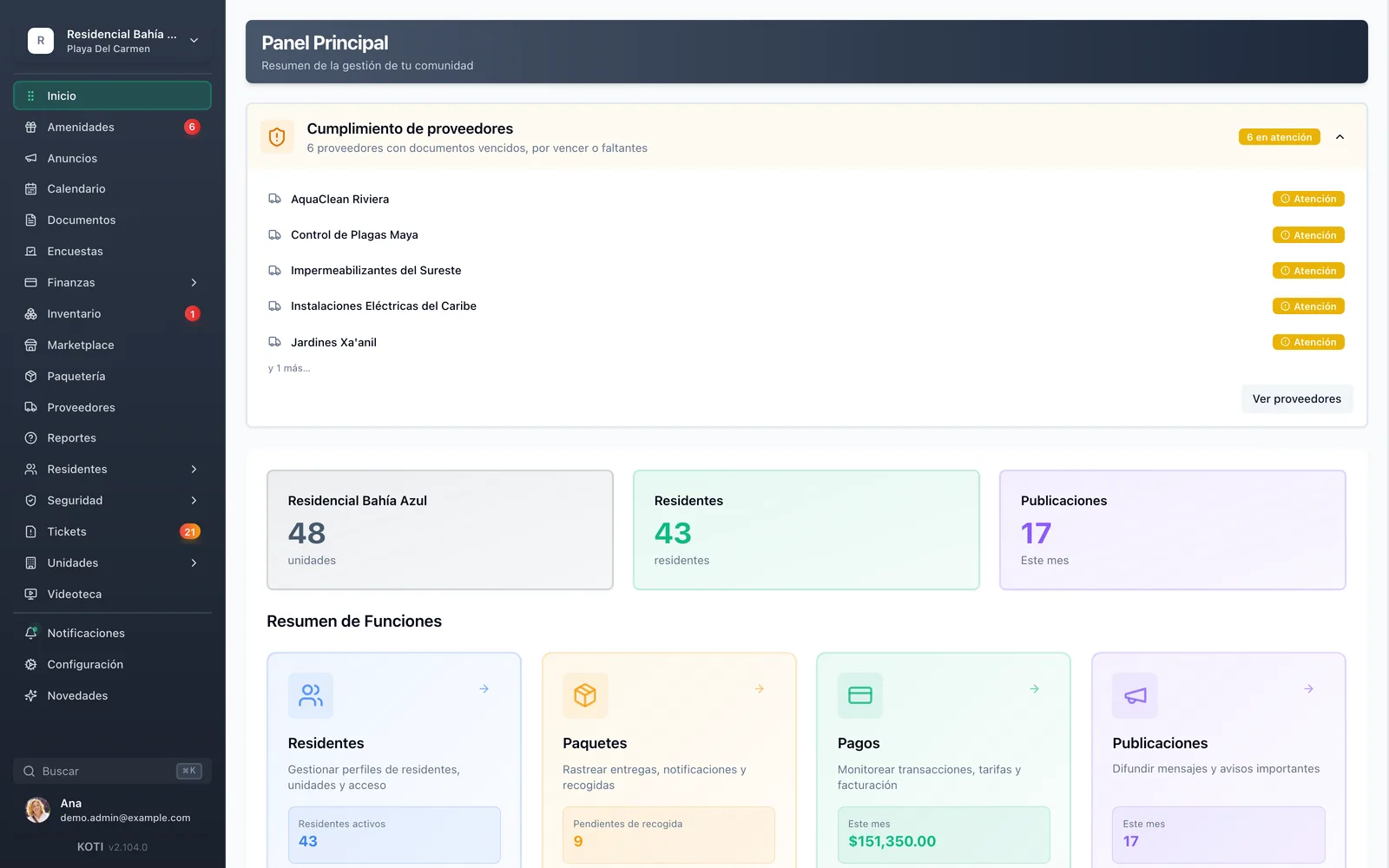
The Koti main panel with the community summary: units, residents, posts this month, and vendor compliance alerts.

The problem

What changes on day one

Today

You find out about problems once the resident has already complained — in the group chat.

With Koti

Transform reactive problem-solving into proactive community management with early visibility.

Today

The information lives in three spreadsheets, two chats and the previous manager’s head.

With Koti

Enhance real-time awareness of community activities and resident needs.

Today

The assembly report gets assembled by hand the night before, and a number is always missing.

With Koti

Streamline board reporting with comprehensive data and meaningful insights.

Admin

Management sees everything in one place

A main panel that summarizes the whole community, and a ledger that turns into the assembly’s report.

The Koti main panel with units, residents, posts this month, vendor compliance alerts and the feature summary.

Overview

See everything that’s happening at a glance

  • Units, residents and posts this month, plus a summary of every module with its key number
  • Vendor compliance alerts: expired, expiring or missing documents, before it becomes a problem
  • Packages awaiting pickup, open tickets and payments for the month, without opening five screens
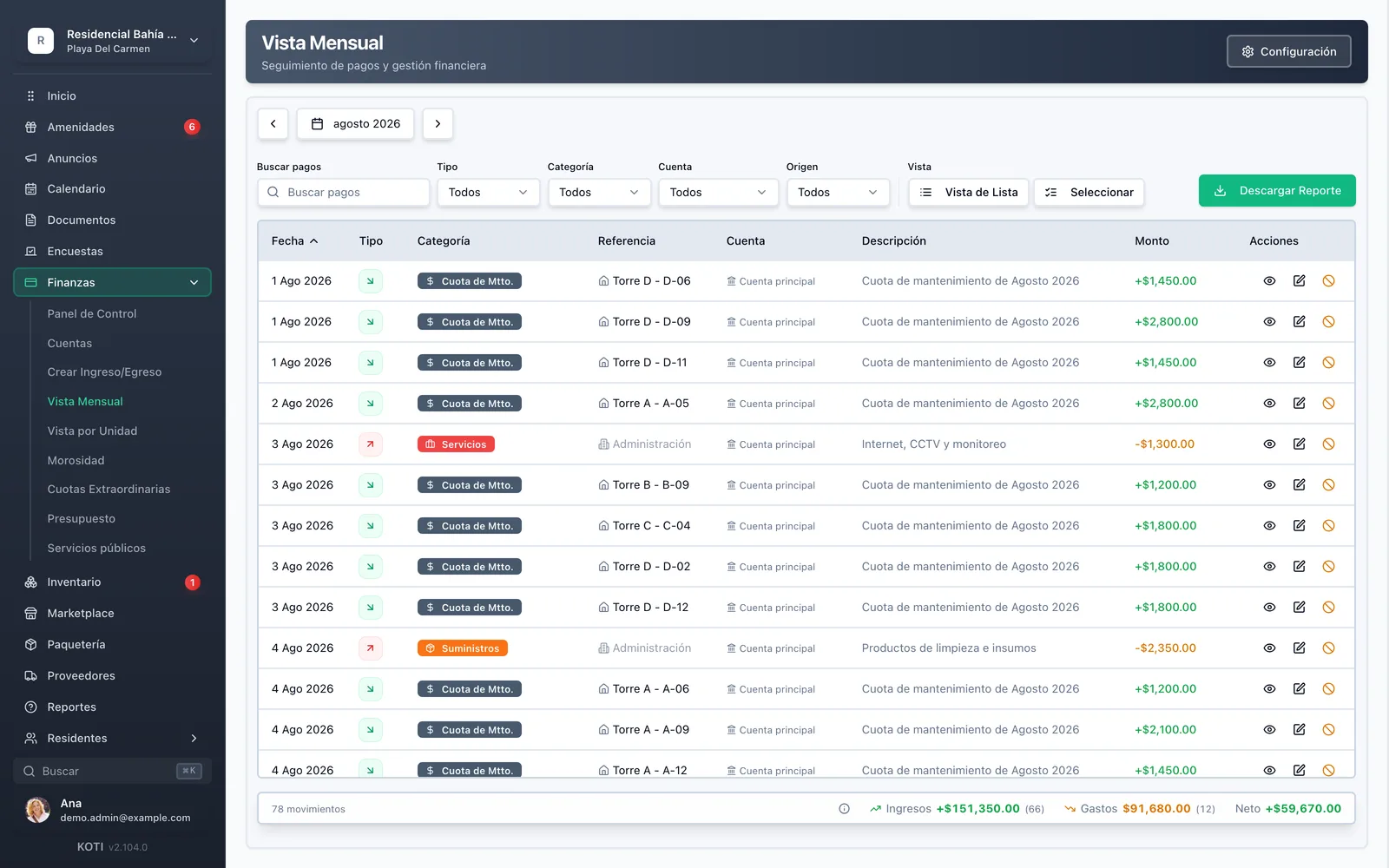
The Koti monthly view with the month’s movements filterable by type, category, account and origin, and the download-report button.

Report

Turn data into decisions

  • Income, expenses and net balance for the month, with the movement count on each side
  • Filter by type, category, account and origin to understand where the money is going
  • Download the month’s report and take it to the assembly as is, with no spreadsheet in between

In detail

Dashboard & reports, in detail

See everything that’s happening at a glance

Your dashboard shows pending invites, recent activity, payment statuses, maintenance requests, and community engagement metrics. Never miss what’s important again — everything you need to know is right there when you log in.

Complete visibility

See every aspect of your community operations in real-time from one central dashboard, instead of reconstructing them by asking around on WhatsApp.

Proactive insights

Spot trends and potential issues before they become problems that disrupt your community. Early-warning indicators let you act before the complaint, not after it.

Data-driven decisions

Make informed management decisions based on actual usage patterns and community metrics: which amenities get used, how collections behave and where spending concentrates.

Professional reporting

Generate comprehensive reports for board meetings and stakeholder presentations instantly, with the movement detail behind every figure in case someone asks.

Monthly financial report

Month-end close with total income, total expenses, net balance, the number of late units, charts of income by type and expenses by category, and the full activity table. Residents can download it too: transparency with no extra work for you.

PDF, CSV and Excel exports

Most reports export to PDF, CSV and Excel — including the delinquency report and the per-unit view — so the number you present at the assembly comes out of the system rather than a hand-built sheet. On the community report you pick a month or a date range, and which sections to include: the transaction table, balances by account, and delinquency at close.

Vendor compliance

The main panel flags vendors with expired, expiring or missing documents, and splits them between “at risk” and “needs attention”. It is exactly the kind of loose end you normally discover only after something happens.

Your turn: set it up in 5 minutes

Try Koti in your community today, without the headaches.

14-day free trial · No credit card required

Prefer to be shown around? Book a demoMessage us on WhatsApp

Security & compliance

SSL/TLS encryption

All communications encrypted and sensitive data protected in transit and at rest.

LFPDPPP compliant

Personal data protection compliant with Mexican law (LFPDPPP).

Daily backups on AWS

AWS infrastructure with automatic daily backups.

Frequently asked questions

The main panel summarizes the whole community: number of units and residents, posts this month, packages awaiting pickup, open tickets and the month’s payment activity. It also flags vendors with expired or expiring documents, so that loose end doesn’t surface only once it is already a problem.
Yes. Most reports export to PDF and CSV, including the monthly financial report, the delinquency report and the per-unit view. The month-end report carries income, expenses, net balance, late units and the charts of income by type and expenses by category.
Yes, if you grant that permission. The monthly financial report is downloadable by residents from their app, in the community finance section, and access is configured separately for owners and for tenants. It is transparency with no extra work: you prepare and send nothing, and the “where did the money go?” questions answer themselves.
Total income, total expenses and net total, each with its change versus the previous month; six months of cash flow; the collection rate; total outstanding split between overdue balance and charges not yet due; and the number of units that are late, current or approaching their due date.
Not to operate the platform. The reports are designed so an administrator can read them and present them at the assembly without accounting training: behind every figure is the movement detail that makes it up, with date, category, account and the unit it refers to.

Start with 14 free days

Set up your community in minutes and try all of Koti — no card, no lock-in.

No credit card requiredSee pricing

See everything in Finance
Questions? Chat with us