You have just taken over the administration and you need to start collecting on Monday. There is no approved budget for software, the board wants to see numbers at the next assembly, and all you have to hand is a computer with Excel.
Below are six complete templates — fee tracking, per-unit statements, annual budget, delinquency aging, maintenance log and assembly roll call — with their real columns, a filled example row and the formula written out so you can copy it as is. There is no form to fill in and no email to leave: the tables are on this page, ready to be selected and pasted into a new sheet.
And at the end is the part almost nobody writes: the exact point where a spreadsheet stops being enough. It is not an opinion, it is four specific and easily recognisable moments. If you have not reached any of them yet, keep the templates — they will serve you for years.
Before you copy: how to set the file up
All six templates live in one single file, with one tab per table. It sounds obvious, and it is exactly the mistake that costs the most: one file per month, another per category, and six months later nobody can answer how much B-204 has owed since January.
- Create a new spreadsheet and name the tabs: Fees, Statements, Budget, Delinquency, Maintenance and Assembly.
- Write the unit identifier exactly the same on every tab. If one says A-101 and another says A101, no lookup will ever match them.
- Freeze the header row and turn on the filter. Everything below assumes your data starts on row 2.
- Format money columns as currency and date columns as dates. If you type the peso sign by hand inside a text cell, SUM will return zero and you will spend half an hour working out why.
- Never merge cells. A merged cell breaks filtering, breaks sorting, and breaks any formula that walks the whole column.
The formulas below are written for Spanish-language Excel and Google Sheets (SI, Y, HOY, SUMA, SUMAR.SI, SUMAR.SI.CONJUNTO, CONTAR.SI and CONTAR.SI.CONJUNTO are IF, AND, TODAY, SUM, SUMIF, SUMIFS, COUNTIF and COUNTIFS), with a comma as the argument separator. If your machine is set to semicolons, swap every comma for a semicolon and they work the same. The function names stay in Spanish because that is what a Mexican machine ships with, but the text inside quotation marks has to match your own sheet exactly: the formulas below quote the English words used in the English tables, so if you label your column Pagado instead of Paid, change the formula too.
Template 1: Monthly fee tracker
This is the tab you will open every day from the 1st to the 10th. One row per unit per month: if you wipe it clean each month you lose the history, so keep a Period column and keep writing downwards.
| Unit | Period | Monthly fee | Due date | Payment date | Amount paid | Method | Reference | Late fee | Balance | Status |
|---|---|---|---|---|---|---|---|---|---|---|
| A-101 | 2026-08 | $1,850.00 | 2026-08-05 | 2026-08-03 | $1,850.00 | SPEI | 0012345678 | $0.00 | $0.00 | Paid |
| B-204 | 2026-08 | $1,850.00 | 2026-08-05 | $0.00 | $92.50 | $1,942.50 | Overdue |
Swipe horizontally to see the full table
Three formulas and the tab maintains itself. On row 2:
- Late fee (column I): =SI(Y(E2="", HOY()>D2), C2*0.05, 0) — applies 5% once the due date has passed and there is no payment date. Change 0.05 to whatever percentage your assembly approved; if your bylaws do not set one, do not invent one.
- Balance (column J): =C2+I2-F2
- Status (column K): =SI(J2<=0, "Paid", SI(HOY()>D2, "Overdue", "Pending"))
And below the table, the two numbers you will be asked for at the meeting: =SUMA(F:F) for what was collected this month, and =SUMAR.SI(K:K, "Overdue", J:J) for what is still outstanding.
The Reference column looks like bureaucracy and is the only thing that will let you find a deposit three weeks later. Never leave it empty.
Template 2: Per-unit account statement
This is the one that ends the argument. When an owner says "I already paid", you do not send them a screenshot from the WhatsApp group: you send them their row. One movement per line, sorted by date, and the running balance calculated, never typed.
| Date | Unit | Description | Reference | Charge | Credit | Balance |
|---|---|---|---|---|---|---|
| 2026-07-31 | A-101 | Opening balance | — | $1,850.00 | ||
| 2026-08-01 | A-101 | August maintenance fee | CUO-2026-08 | $1,850.00 | $3,700.00 | |
| 2026-08-03 | A-101 | SPEI payment | 0012345678 | $3,700.00 | $0.00 | |
| 2026-08-15 | A-101 | Special assessment, roof waterproofing | EXT-2026-01 | $2,400.00 | $2,400.00 |
Swipe horizontally to see the full table
The balance on the first line is typed by hand exactly once: it is the balance you are starting from. From there down, in G3: =G2+E3-F3, dragged to the bottom. If the running total gives you a number that does not add up, the error is in a row, not in the formula — which is precisely why it is calculated and not typed.
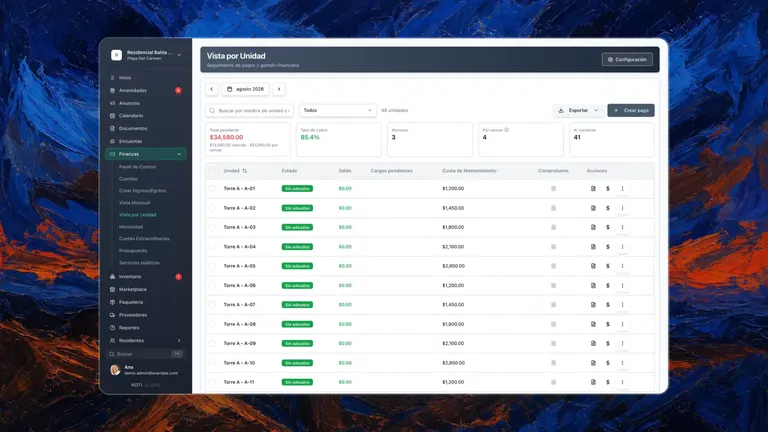
To produce one unit's statement, filter the Unit column and print to PDF. With twelve units that is a minute. With a hundred and twenty it is your Sunday, and it is exactly the work that does itself once the movements already live in a system: that is how Koti's per-unit statements work, and they also download in bulk — one PDF per unit inside a single file.
Template 3: Annual budget versus actual spend
The budget is the document the assembly approves and the one you will be measured against all year. The template serves one purpose: letting you say, in any month and in thirty seconds, which line item is running over what was approved.
| Line item | Category | Annual budget | Monthly budget | Actual spend this month | Variance | % spent |
|---|---|---|---|---|---|---|
| Security | Services | $480,000.00 | $40,000.00 | $41,200.00 | -$1,200.00 | 8.6% |
| Landscaping | Maintenance | $96,000.00 | $8,000.00 | $8,000.00 | $0.00 | 8.3% |
| Common-area electricity | Utilities | $144,000.00 | $12,000.00 | $13,450.00 | -$1,450.00 | 9.3% |
| Reserve fund | Reserve | $120,000.00 | $10,000.00 | $10,000.00 | $0.00 | 8.3% |
Swipe horizontally to see the full table
- Monthly budget (D2): =C2/12
- Variance (F2): =D2-E2 — it goes negative when you overspent. Add conditional formatting in red and the topic raises itself at the meeting.
- % spent (G2): =E2/C2 formatted as a percentage. Watch what it compares: it is one month against the whole year, so with even spending each line sits around one twelfth, 8.3%, and the line that keeps climbing above that month after month is the one that will blow the annual budget. If what you want is the cumulative figure, add a column with year-to-date spend and divide that column by C2.
The other half of the budget is income, and that is where the arithmetic goes wrong most often. In most Mexican condominiums the maintenance fee is not split equally between homes: it is split according to each unit's undivided ownership share — the indiviso — as recorded in the founding deed and the bylaws. The annual budget total goes below the last line-item row on this tab — with four line items, in C6: =SUMA(C2:C5) — and you already have the register of shares in column B of the Assembly tab. The monthly fee for a unit is then =B2*Budget!$C$6/12, written on the Assembly tab next to the share; that result is what you copy into the Monthly fee column of the Fees tab.
If every unit in your development has the same share, the result is identical to dividing by the number of homes. If they do not, the difference is what ends up as a complaint. We work it through in how the maintenance fee is calculated by ownership share.
Template 4: Delinquency tracker by age
Not every overdue balance is the same: thirty days is forgetfulness, ninety days is a problem. The delinquency template exists to separate them, because they call for different actions.
| Unit | Owner | Total balance | 1 to 30 days | 31 to 60 days | 61 to 90 days | Over 90 | Last payment | Last action | Next step |
|---|---|---|---|---|---|---|---|---|---|
| B-204 | María Fernández | $7,400.00 | $1,850.00 | $1,850.00 | $1,850.00 | $1,850.00 | 2026-04-12 | 2026-08-02, written reminder | Letter from the board |
| D-02 | Jorge Ramírez | $3,780.00 | $1,890.00 | $1,890.00 | $0.00 | $0.00 | 2026-06-30 | 2026-08-10, phone call | Payment agreement |
Swipe horizontally to see the full table
- Total balance (C2): =SUMA(D2:G2)
- Days overdue, if you prefer the raw number over buckets: =HOY()-H2
- How many units are overdue: =CONTAR.SI(C2:C49, ">0")
- How much money sits in the oldest bucket: =SUMA(G2:G49) — the number that actually matters, because it is the one that rarely comes back.
The two columns on the right are the ones almost nobody adds and the only ones that hold up in an assembly: when the last action was taken and what comes next. Without them the sheet tells you who owes but not what you have done about it, which is exactly the question you will be asked.
Before writing anything under "next step", read what you can and cannot do about a delinquent neighbour: cutting off their water or posting the debtor list at the gatehouse puts you on the wrong side of it.
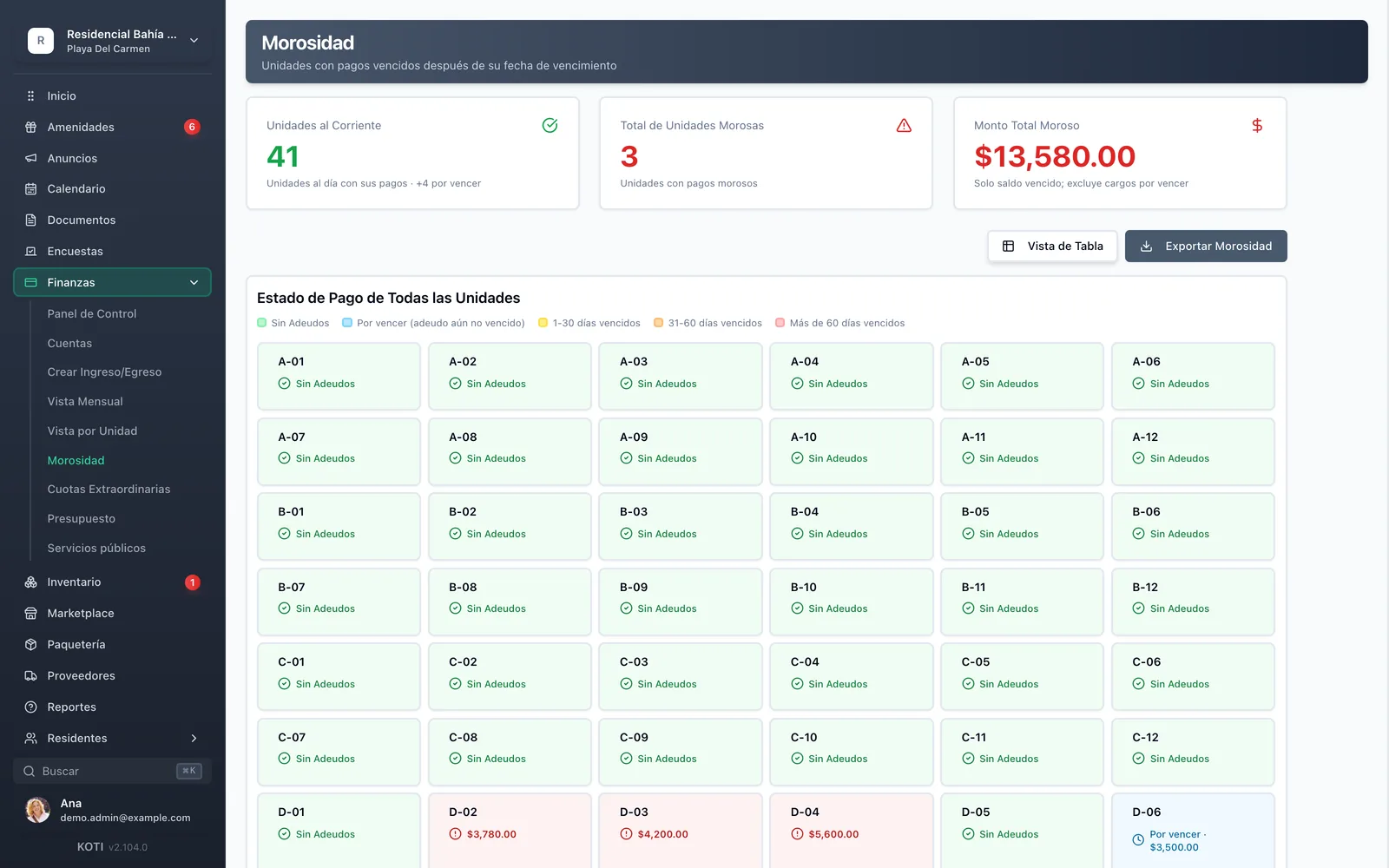
The self-updating version of this tab is Koti's delinquency tracking: the same aging idea with the buckets the system ships — no debt, due soon, 1 to 30 days overdue, 31 to 60, and over 60 — calculated from payments already recorded, and exportable to PDF, CSV or Excel to take to the meeting. If you need to split 61 to 90 from over 90, that split stays the spreadsheet's job.
Template 5: Maintenance and incident log
This is the least-used template and the one that protects you most. It is the record that the pump was repaired on August 4th, who authorised it and what it cost — the answer to "where did the money go?" a year later, when nobody remembers.
| Ref | Reported on | Area or asset | Description | Reported by | Owner | Priority | Status | Closed on | Cost | Vendor |
|---|---|---|---|---|---|---|---|---|---|---|
| MTO-2026-041 | 2026-08-04 | Water pump, machine room | Leak in the mechanical seal | A-101 | Management | High | In progress | $3,800.00 | Hidráulica del Sureste | |
| MTO-2026-042 | 2026-08-06 | Walkway C light fixture | Burnt photocell, does not switch on at night | C-07 | Maintenance | Medium | Closed | 2026-08-08 | $640.00 | In-house |
Swipe horizontally to see the full table
- Days open (extra column at the end): =SI(I2="", HOY()-B2, I2-B2)
- Year-to-date cost: =SUMA(J:J)
- How much one asset has cost you: =SUMAR.SI(C:C, C2, J:J) — the formula that tells you, with numbers, that repairing the pump has already cost more than replacing it.
The reference number matters more than it looks: it is what ties the expense on the budget tab back to the report that caused it. Write the reference into the expense description and next year, when somebody asks about the $3,800 from August, the answer is a search rather than an excavation.
The log stops fitting in a spreadsheet when the person reporting is no longer you, but the resident, from their phone, with a photo. That is where maintenance tickets come in, with an owner, a status and a close confirmed by whoever reported it.
Template 6: Assembly roll call and resolutions
This is where a badly built roll call brings the assembly down, and almost never because of the formula: because of the base you are adding up. How quorum is counted and how a vote is weighted changes from state to state, and within a single state the two answers need not agree:
- Mexico City: quorum is counted by heads — «se requerirá de una asistencia del 75% de los condóminos» on first call, and on second call «el quórum se integrará con la mayoría simple del total de condóminos» (art. 32 sec. IV) — but the vote goes by share: «Cada condómino contará con un número de votos igual al porcentaje de indiviso» (art. 31 sec. III).
- State of Mexico: both go by head. It opens on first call with «más del cincuenta por ciento de los condóminos» and on second call «con los asistentes» (art. 28 sec. VII), and each owner has «un solo voto no importando cuantas unidades de propiedad exclusivas posea», except in commercial and industrial condominiums (art. 28 sec. II).
- Quintana Roo: there the quorum itself sits on the undivided share — «75% del proindiviso del condominio» on first call and «por lo menos del 51 % del proindiviso» on second (art. 29).
That is why the template carries both bases in the same table: you capture once and add up whichever one applies to you.
| Unit | Share | Current on fees | Attended | Represented by | Vote on item 3 |
|---|---|---|---|---|---|
| A-101 | 1.85% | Yes | Yes | Owner | In favour |
| B-204 | 1.85% | Yes | Yes | Power of attorney, spouse | Against |
| C-07 | 2.40% | Yes | No | — | — |
| D-02 | 1.90% | No | Yes | Owner | Voice, no vote |
Swipe horizontally to see the full table
- Owners present who count (quorum by head): =CONTAR.SI.CONJUNTO(D2:D49, "Yes", C2:C49, "Yes")
- Share present that counts (quorum by share): =SUMAR.SI.CONJUNTO(B2:B49, D2:D49, "Yes", C2:C49, "Yes")
- Votes in favour by head: =CONTAR.SI(F2:F49, "In favour")
- Share in favour: =SUMAR.SI.CONJUNTO(B2:B49, F2:F49, "In favour", C2:C49, "Yes")
- Share against: =SUMAR.SI.CONJUNTO(B2:B49, F2:F49, "Against", C2:C49, "Yes")
The Current on fees column is one almost no roll call carries, and it is the one that decides whether the assembly was validly seated. In Mexico City a delinquent owner's vote is suspended «conservando siempre su derecho a voz» — they keep the right to speak — and they «no serán considerados para el quórum de instalación de la Asamblea General» (art. 34: two unpaid ordinary fees, or one special assessment). Mind the exception that same article opens with: in assemblies convened to amend the constitutive deed, wind up the regime or affect title to the property, a delinquent owner does vote. Excluding them there is exactly what makes the most expensive assembly to re-run challengeable. In Quintana Roo the share of the unit whose owner or occupant defaulted «no será considerado para los efectos de la instalación de la Asamblea, ni podrá tener derecho a voto» (art. 32). If your state law has no such exclusion, put Yes down the whole column and the result is the same.
Run both counts before you seat the meeting, because they do not agree. With 48 units and 26 owners present and current on their fees, the head count is 54%: in Mexico City that falls short on first call and clears on second (art. 32 sec. IV); in the State of Mexico it passes from the first call (art. 28 sec. VII). In Quintana Roo those 26 units tell you nothing until you add up their undivided share and compare it against the 75% or the 51% of art. 29.
And a second, short table so resolutions do not live only in the minutes — record the result in whatever unit your state uses, share or votes:
| Item | Resolution | In favour | Against | Abstained | Owner | Committed date |
|---|---|---|---|---|---|---|
| 3 | Roof waterproofing, special assessment of $2,400 per unit | 62.4% | 18.1% | 4.2% | Management | 2026-09-30 |
Swipe horizontally to see the full table
Quorum percentages, notice periods and who may vote change from state to state, and no template solves that part: check it in the condominium law that applies to you and in your own bylaws. How to convene, seat and minute the meeting is in our guide to organising a condominium assembly.
The five mistakes that break the sheet after six months
These templates hold up until somebody breaks them, and it is almost always one of these five things:
- A new file every month. The most common one. It breaks the history, and the history is exactly what you need to collect a balance from eight months ago. One tab that grows downwards, with a Period column.
- The same value written differently. A-101, A101, Tower A 101 and "Mari's house" are four different units as far as Excel is concerned. Set the format on day one and do not negotiate it.
- Amounts and dates stored as text. It happens when you paste from the bank portal or from a message. If the column does not right-align by itself, it is text, and no sum will be correct.
- Merged cells to make it look tidy. Every merged cell is a formula that will fail the day you sort the table, and nobody will notice on the day.
- Formulas overwritten by hand. Somebody types a balance over the formula that was calculating it, because that way it adds up. From that moment the sheet lies, and it does not warn you.
If you protect one single thing, protect the columns that hold formulas: lock them and leave only the data-entry columns editable.
Where a spreadsheet stops working
A well-built spreadsheet holds up far longer than people tend to say. But it stops being enough at four specific moments, and it is worth recognising them before you are inside one:
1. When more than one person is entering data. The day you and the treasurer edit the same file, fee_tracker_v3_FINAL(1).xlsx appears and nobody knows which one is authoritative. A shared cloud sheet solves simultaneous editing, but it does not answer the next question: who changed that balance, and when.
2. When you have to reconcile against the bank. The sheet cannot see your account. Every transfer gets recorded twice — once by the bank, once by you — and the deposit that arrives without a reference has no owner until somebody sends the receipt. That case has its own name and its own handling: unidentified payments.
3. When every resident wants their own statement. Filtering and printing twelve PDFs is doable; a hundred and twenty is not. And the resident does not want a PDF either: they want to open their balance on their phone at eleven at night without messaging you.
4. When the administrator changes. This is where a spreadsheet fails worst, because what gets handed over is a file, not a history. There is no way to know who changed what or when, and the incoming administration inherits numbers it cannot audit. Koti has two kinds of administrator — general, who sees everything, and limited-access, restricted to the areas you assign: finance, operations, security, communication or residents — and when somebody leaves the role is removed, but the history of what they did is kept. How those accesses are divided up is covered in staff and administration.
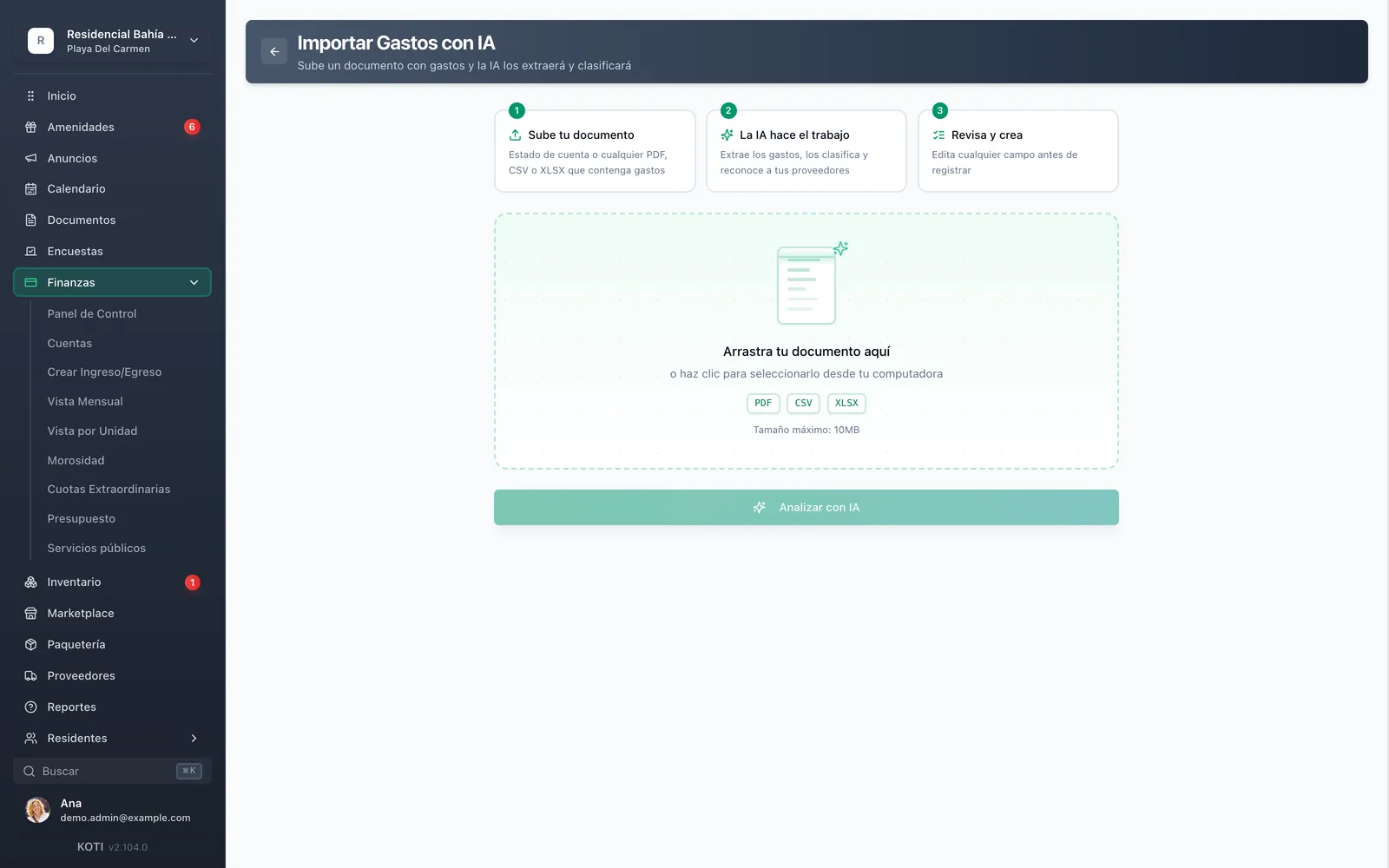
The good news for anyone who already built the sheet: it does not get thrown away. Koti imports expenses from PDF, CSV or XLSX — the bank statement or your own spreadsheet — the AI extracts and classifies them, flags possible duplicates before they are created, and keeps the original file attached to the movements that came out of it, so the backup travels with the record. That is AI expense capture; the rest of the cycle lives in the financial module.
These six templates are free because they have to be: they are columns and formulas, not a product. Copy them, adapt them to your community's vocabulary and use them for as long as they serve you. An administrator with a well-built spreadsheet works better than one with a system nobody ever configured.
The day you cross any of the four limits above, what you need is not a better template: it is for that same data to live somewhere several people can work on at once, where every unit can check its own balance without you assembling anything, and where it is recorded who did what.
Koti costs $19 MXN + VAT per unit per month, with a minimum fee equivalent to 40 units — $760 MXN + VAT — for smaller communities. The trial runs 14 days and asks for no card. You can see the full breakdown on pricing or book a demo and bring your current spreadsheet open: the first question we ask is which columns you already have.
Try Koti for free
Simplify your condo management: dues, access and announcements in one place. 14 days free, no credit card.
Official sources
Every article cited in this guide was checked against the text published by the body that issued it. Condominium law in Mexico is state law: always read your own state’s, and confirm the date of the latest amendment before acting.
- Ley de Propiedad en Condominio de Inmuebles para el Distrito Federal
Mexico City · Last amended: 04-08-2023 (G.O. CDMX) · Checked: 2026-08-09
- Ley que Regula el Régimen de Propiedad en Condominio en el Estado de México
State of Mexico · Last amended: 29-04-2024 (P.O. «Gaceta del Gobierno») · Checked: 2026-08-09
- Ley de Propiedad en Condominio de Inmuebles del Estado de Quintana Roo
Quintana Roo · Last amended: 12-11-2021 (P.O. del Estado) · Checked: 2026-08-09
This guide is general information, not legal advice. For a specific matter, consult a lawyer in your state.
Written by
Equipo Koti
Condo Management Experts
The Koti Smart Communities team shares knowledge and best practices for efficient condo and residential community management.